Wednesday, March 13, 2024

Read Porsche BCM 2M25J with Xtool KC501

 How-to: read Porsche Continental BCM which was installed in all cars from 2011 to 2018 using Xtool tablet (X100 PAD3, X100 MAX, H6, H6 Pro, and many more) and KC501 programmer.

Read Porsche BCM 2M25J with Xtool KC501 1

In order to prepare dealer key and learn key, we need to read Dflash data from the BCM.

Connect xtool table with KC501 and vehicle

Select Special function->Key Programmer->Porsche->Panamera->Immobilizer->2011-2017-> Read Dflash

Read Porsche BCM 2M25J with Xtool KC501 2

Read Porsche BCM 2M25J with Xtool KC501 3

Choose processor, here choose BCM 2M35J->DFlash

Read Porsche BCM 2M25J with Xtool KC501 4

Check operation instruction

Read Porsche BCM 2M25J with Xtool KC501 5

BCM 2M25J (Metal Crystal Oscillator)

Read Porsche BCM 2M25J with Xtool KC501 6

We will see wiring diagram to BCM

Xtool wirings require to remove components.

Read Porsche BCM 2M25J with Xtool KC501 7

Read Porsche BCM 2M25J with Xtool KC501 8

Read Porsche BCM 2M25J with Xtool KC501 9

Follow wiring diagram to connect BCM with Xtool KC501

Read Porsche BCM 2M25J with Xtool KC501 10

Read Dflash and save

Read Porsche BCM 2M25J with Xtool KC501 11

Read Porsche BCM 2M25J with Xtool KC501 12

Generate dealer key

Upload Dflash saved and select an unused key position to generate dealer key.

Read Porsche BCM 2M25J with Xtool KC501 13

Read Porsche BCM 2M25J with Xtool KC501 14

After generating dealer key you can learn key with the xtool kc501.

 Read Porsche BCM 2M25J with Xtool KC501 15

http://blog.obdii365.com/2024/03/13/read-porsche-bcm-2m25j-with-xtool-kc501/

Wednesday, February 28, 2024

Xtool KS01 vs Xtool AnyToyo SK1 Toyota Emulator

 What’s the difference between Xtool KS-01 and AnyToyo SK1 emulators for Toyota/Lexus?

Xtool KS01 vs Xtool AnyToyo SK1 Toyota Emulator

To program Toyota/Lexus car keys through Xtool scanners, you must use emulators. Xtool produces two emulators KS1 and AnyToyo SK1. The table shows how these emulators differ.

KeyXtool KS-01Xtool AnyToyo SK1
94/D4X
98X
39X
88/A82013-20172017+
A92013-20172017+
4AX

X- not supported
√ supported
The manufacturer may make changes to the compatibility policy.


www.obdii365.com

Friday, February 2, 2024

How to Add FCA SGW AutoAuth to Xtool Scanner?

 Xtool diagnostic scanner users can now access the SGW module and perform previously restricted operations simply by registering with the authentication service AutoAuth, without requiring additional accessories. Users can register via AutoAuth’s web-based registration portal, selecting the desired package. Then add the Xtool diagnostic tool.

Xtool will release the software to specific professional diagnostic tools in the North American market that have subscribed to the software. Users whose subscription period has expired can renew their subscription through their authorized Xtooltech reseller to update the FCA software.

In 2018, the Security Gateway Module (SGW) was implemented by FCA USA to prevent unauthorized access. FCA said that SGW was developed to limit “the ability of non-registered and non-authenticated users to perform intrusive diagnostics such as bi-directional controls”, so users cannot directly clear the DTC, as well as any bi-directional control test (including actuation, relearn and calibration) on vehicles equipped with SGW.


Authorized Scan Tool Models

Xtool H6 Pro3 (more to come)

Xtool H6 Pro3

Steps to Access the SGW with Xtool

1.ACCOUNT REGISTRATION

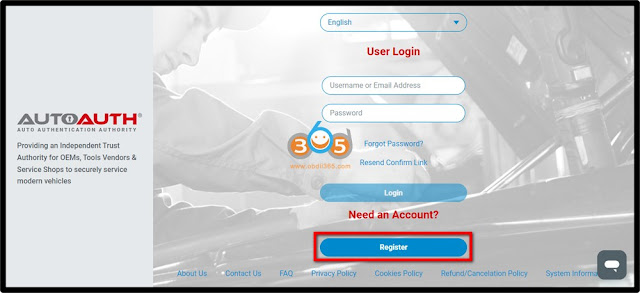
• Visit: www.autoauth.com >> click Register
Add FCA SGW AutoAuth to Xtool Scanner 1
• Complete and submit the User Signup

Add FCA SGW AutoAuth to Xtool Scanner 2

• A confirmation email will be sent to you to verify your email address.


2. SET YOUR ACCOUNT
• Log in to the AUTOAUTH website: www.autoauth.com

Add FCA SGW AutoAuth to Xtool Scanner 3

• Register your Shop&Techs accounts on Autoauth.

1) For Shop Owner:

Select Service Center Signup / Independent Technician Signup to register for your shop and add techs as users to Shop Account

2) For technicians:

Select User Profile to create your account, and provide your username to the shop owner to be added to the Shop Account

Add FCA SGW AutoAuth to Xtool Scanner 4

• A confirmation email will be sent to you to verify your email address.


3.ADD TOOL

• Select Manage Tools from the left menu >> select Add Tool, fill in the following:
1) Manufacturer – Select Xtooltech Co
2) Tool Model – Select ALL MODELS
3)Serial Number – Enter the serial number listed on the back of your diagnostic tool

Add FCA SGW AutoAuth to Xtool Scanner 5

Add FCA SGW AutoAuth to Xtool Scanner 6

4.UPDATE XTOOL SOFTWARE

• Ensure the software update the latest version:
1) Application: V 5.5.2 or newer
2) Chrysler: V 10.0 or newer
If your device is not within the subscription period, please contact your dealer to renew.

Sunday, January 14, 2024

Xtool X100 PAD3 Read MQB NEC35XX Immo Data via OBD

 Xtool immo tablets can read immo data from VAG MQB NEC35XX Continental/VDO clusters by OBD.


For example:

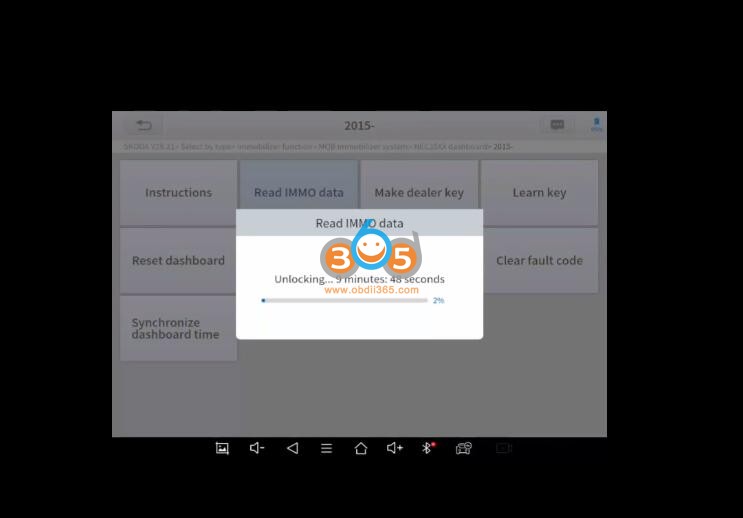
Use xtool x100 pad3 SE i read cluster from skoda fabia MQB nec35xx by obd but you must wait 10min to unlock the mcu nec35xx and 2 min to read immo data and you can add key. It takes 15 min to get immo data.


Menu path:

Select by type->Immobilizer->MQB Immobilizer system->NEC35XX Dashboard->2015-> Read IMMO Data

Xtool X100 PAD3 Read MQB NEC35XX Immo Data via OBD 1

Xtool X100 PAD3 Read MQB NEC35XX Immo Data via OBD 2
Xtool X100 PAD3 Read MQB NEC35XX Immo Data via OBD 3

Xtool X100 PAD3 Read MQB NEC35XX Immo Data via OBD 4
Xtool X100 PAD3 Read MQB NEC35XX Immo Data via OBD 5

Xtool X100 PAD3 Read MQB NEC35XX Immo Data via OBD 7

Xtool X100 PAD3 Read MQB NEC35XX Immo Data via OBD 8

NOTE:

Yes for vdo continental. If it is JC cluster, it is not supported.

JC cluster you need to disassemble the dashboard and read it on the table with the vvdi programmer or xp400 pro.

Nec35 locked JC cluster you need to do it on bench via vvdiprogMQB solder free Adapters are cleaner and easier to use.

How to Read MQB D70F3537 with Xhorse MQB48 Solder Free Adapter?

or read immo data with xp400 pro with APB130.

Read VW Polo MQB48 IMMO Data with Autel IM608 and APB130

Rh850 needs podiag interface or vvdi key tool plus rh850 adapter to read immo data.

Monday, November 20, 2023

Xtool X100 PAD3 Program Volvo XC60 2021 All Key Lost

 How to program Volvo xc60 2021 hybrid all key lost by xtool x100 pad3 and KC501 programmer.


Select EEPROM Adapter->Read/Write ECU->Volvo->CEM(SPC5784G)->Operating instructions

Xtool X100 PAD3 Program Volvo XC60 2021 All Key Lost 1

Check wiring diagram

Xtool X100 PAD3 Program Volvo XC60 2021 All Key Lost 2

Connect KC501 with CEM module followed the wiring

Xtool X100 PAD3 Program Volvo XC60 2021 All Key Lost 3

Xtool X100 PAD3 Program Volvo XC60 2021 All Key Lost 4

Read CEM data

Xtool X100 PAD3 Program Volvo XC60 2021 All Key Lost 5

Save CEM data

Xtool X100 PAD3 Program Volvo XC60 2021 All Key Lost 6

Then program key.

Select Volvo XC60->2018-2021->with keyless proximity

Upload CEM data read above

Put a new key to be programmed to the induction area

Enter extended mode
Security verification system login
Read number of keys
Start key learning
Program success.

Xtool X100 PAD3 Program Volvo XC60 2021 All Key Lost 7

Xtool X100 PAD3 Program Volvo XC60 2021 All Key Lost 8

Xtool X100 PAD3 Program Volvo XC60 2021 All Key Lost 9

Test the new key.

Done.

Monday, November 13, 2023

Xtool IK618 Program Toyota 8A H All Keys Lost

 Tutorial: How to program Toyota 8A (H) Chip non-smart key all key lost using Xtool and M822 adapter.


Tool used:

Xtool InPlus IK618 (or X100 PAD3, X100 PAD3 SE, X100 MAX, D8, D9D9 Pro, A80PRO, IP819, IK618, D8BT, A80, A80PRO MASTER, IP616, IP819TP etc)

XTOOL M822 Adapter For Toyota 8A AIl Key Lost
XTOOL KC100 or KC501
XTOOL KS-1 for Toyota Smart Key All Key Lost

Xtool IK618 Program Toyota 8A H All Keys Lost 1

Vehicle Coverage:

For Toyota Levin
For Corolla
For RAV4
For Prado
For Land Cruiser
For Camry
For Highlander
For Reiz
For Sienna
For Hiace
For Hilux
For Crown Kluger
For Aygo with IMMO box F3-F4-K6-S6


Procedure:

1.Back up Immo data

2.Generate emulator key

3.Add key


1.Back up Immo data

Select Toyota->By Type->All blade keys lost (8A)->Wiring diagram->Corolla

Xtool IK618 Program Toyota 8A H All Keys Lost 2

Xtool IK618 Program Toyota 8A H All Keys Lost 3

Xtool IK618 Program Toyota 8A H All Keys Lost 4


Connect M822 Toyota harness with vehicle follow the wiring diagram

Xtool IK618 Program Toyota 8A H All Keys Lost 5

Xtool IK618 Program Toyota 8A H All Keys Lost 6

Xtool IK618 Program Toyota 8A H All Keys Lost 7

Xtool IK618 Program Toyota 8A H All Keys Lost 8

Xtool IK618 Program Toyota 8A H All Keys Lost 9

Read Immobilizer data

Xtool IK618 Program Toyota 8A H All Keys Lost 10

Save immo data

Xtool IK618 Program Toyota 8A H All Keys Lost 11

2.Generate emulator key

Insert KS-01 emulator into KC100 or KC501 programmer

Select Generate 8A simulator key

Choose a key position to generate key (if emulator cannot start, choose other key position)

Xtool IK618 Program Toyota 8A H All Keys Lost 12

Xtool IK618 Program Toyota 8A H All Keys Lost 13

Generate emulator key successfully. The KS-01 emulator key can start car.

Xtool IK618 Program Toyota 8A H All Keys Lost 14

3. Add keys

Choose Key programming function->Add keys

Xtool IK618 Program Toyota 8A H All Keys Lost 15

Turn on ignition switch with KS-01 emulator

Then insert a key to be programmed and turn on ignition.

Xtool IK618 Program Toyota 8A H All Keys Lost 16

Xtool IK618 Program Toyota 8A H All Keys Lost 17

Xtool IK618 Program Toyota 8A H All Keys Lost 18

Security light turns off. Programming completed.

Test the new key.

www.obdii365.com