Thursday, August 8, 2024

Xtool X100 PAD Elite vs IK618 vs X100 PADS vs X100 Pro2

 Xtool ley programming tools comparison:

Xtool X100 PAD Elite 2 vs X100 PAD Elite (X100 PAD3) vs IK618E vs X100 PADS vs X100 Pro2

Check image below

Xtool X100 PAD Elite vs IK618 vs X100 PADS vs X100 Pro2

Elite2 with V208 VCI with KC501 integrated, it supports bench programming and remote testing.
IK618 and X100 PADS have more special functions. They perform similar immo functions.
X100 Pro2 is the entry-level DIY tool, it does the least IMMO coverage.

Friday, August 2, 2024

Xtool X100 PAD3 Program VW Tiguan 2018 MQB Key via OBD

 It is a VW Tiguan 2018 with analog instruments. We are going to add a 3rd key for the car.

There are 2 options for this.

1.order original key through the dealer, wait a month and then register all the keys online
2.use third-party tools

Xtool X100 PAD3 will do this MQB with the analog instrument.

In order to program a new key, you need
1 Use the Xhorse XSMQB smart remote
2. Generate key for VW Tiguan with VVDI Mini Key Tool
3. With xtool x100 pad3
Read immo data from the instrument cluster via OBD
Read synchronization data from the original key

Xtool X100 PAD3 Program VW Tiguan 2018 MQB Key via OBD 1

Read syn data from original MQB key

We make a dealer key from the Xhorse XSMQB series key using the immobilizer and synchronization data read by xtool pad3.

Xtool X100 PAD3 Program VW Tiguan 2018 MQB Key via OBD 2

Xtool X100 PAD3 Program VW Tiguan 2018 MQB Key via OBD 3

We re-register all the keys in the dashboard (2 original and one new).

Xtool X100 PAD3 Program VW Tiguan 2018 MQB Key via OBD 4

Xtool X100 PAD3 Program VW Tiguan 2018 MQB Key via OBD 6

Xtool X100 PAD3 Program VW Tiguan 2018 MQB Key via OBD 7


Thursday, July 11, 2024

Xtool D7 Program 2016 Citroen C4 Blade Key

 How to program a cheap ebay key (£16) for a 2016 Citroen C4 Cactus using the Xtool D7 or D8 obd2 diagnostic scanner. Citroen Dealer quoted £300!


Peugeot share the same procedure.

Xtool D7 Program 2016 Citroen C4 Blade Key 1

Procedure:

Go to Special Function->Program Key-> Citroen->Read security code
Automatic identify
Turn on ignition
Then switch ignition off

Reading pin code.

Follow xtool d7 prompt to turn on/off ignition
Press OK, then switch ignition on immediately
switch ignition off
Press OK, then switch ignition on immediately

Read pin code successfully.

Xtool D7 Program 2016 Citroen C4 Blade Key 2

Xtool D7 Program 2016 Citroen C4 Blade Key 3

Xtool D7 Program 2016 Citroen C4 Blade Key 4

Xtool D7 Program 2016 Citroen C4 Blade Key 5

Xtool D7 Program 2016 Citroen C4 Blade Key 6

Select Program Key-> Citroen->Select from vehicle-> C4 Cactus->Blade key
Xtool D7 will detect BSI, software and VIN info.

Save a screenshot

Xtool D7 Program 2016 Citroen C4 Blade Key 7

Xtool D7 Program 2016 Citroen C4 Blade Key 8

Xtool D7 Program 2016 Citroen C4 Blade Key 9

Select Program Key
All keys will be erased.
Auto input PIN to proceed.
Input number of keys: 2 to be programmed.

Xtool D7 Program 2016 Citroen C4 Blade Key 10

Switch ignition off
Insert the new key within 15s and switch ignition on

Xtool D7 Program 2016 Citroen C4 Blade Key 11

Program success, switch the ignition off and remove the key.
End programming, if you want to program the remote, switch ignition on, press any key of remote at least 3s.

Xtool D7 Program 2016 Citroen C4 Blade Key 12

Xtool D7 Program 2016 Citroen C4 Blade Key 13

I have done 3 different car keys so far.
I added a new key and also had to add the original key.


www.obdii365.com


http://www.key-programmer.org/2024/07/12/how-to-add-2016-citroen-c4-key-fob-with-xtool-d7-d8/

Sunday, April 7, 2024

Xtool Program 2021 Nissan Sentra Smart Key Bypass PIN Code

 Tutorial: How to add Nissan Sentra/New Sylphy (B18) 2021 using xtool tablets (x100 pad3, x100 pad elite, x100 max, A80, h6 pro etc) and Nissan 16+ 32 gateway adapter bypass pin code.


NOTE: Only supports adding key to B18 bypass pin code. All Keys lost requires pin from 3rd party.


Main steps:

  • Backup HFM Module data
  • Write HFM Config data
  • Back up IMMO data
  • Read key
  • Program key


Procedure:

Connect OBD connector of main test cable connects with female end of the gateway cable.
Another end of main test cable connect with Xtool tablet. Male OBD end of gateway connects with car.

Xtool Program 2021 Nissan Sentra Smart Key Bypass PIN 1

Open hook
Find the fuse box and open it
Turn back,
Find the pink & blue wire on the specific interface (pin 4 &6 from to to bottom)
Connect black one to pink, red one to blue

Xtool Program 2021 Nissan Sentra Smart Key Bypass PIN 2

Xtool Program 2021 Nissan Sentra Smart Key Bypass PIN 3

Go to Nissan software->Program keys-> Select by model->China->New Sylphy (B18)

*It works on Nissan Sentra/New Sylphy B18 global though it enters via China region.

Xtool Program 2021 Nissan Sentra Smart Key Bypass PIN 4

If see the HFM version number means that the tablet communicates with car immobilizer system successfully.

Select Key matching (Bypass)->Read IMMO Data
Require network connection. Add key needs to turn on igntion switch using the original key.
The whole process takes about 20 minutes.

Xtool Program 2021 Nissan Sentra Smart Key Bypass PIN 5
Make sure all connectors are securely connected, especially two lines in the fuse box.

Back up and save HFM configuration data

Xtool Program 2021 Nissan Sentra Smart Key Bypass PIN 6
If you finish the process but the smart key has no smart functions or no remote (for 4-button smart key), you need to write the config data that read before into the smart module.

Xtool Program 2021 Nissan Sentra Smart Key Bypass PIN 7

Read Configure system 1
Read IMMO data successfully. this data can be used to program key bypass pin code.

Xtool Program 2021 Nissan Sentra Smart Key Bypass PIN 8
Press and hold the Start/Stop button to turn off the ignition switch.
Turn on the ignition. If you are using 4-button keys, you need to put the key close to the start/stop button.
Read Configure system 2
Read immo data successfully

Xtool Program 2021 Nissan Sentra Smart Key Bypass PIN 9

Select Read & Write smart module configuration
Select Write the HFM module configuration

Xtool Program 2021 Nissan Sentra Smart Key Bypass PIN 10

The remote of the original key may fail after reading the immobilizer data. We need to write smart box configuration, then remote control will work after writing.
Upload HFM cofig data just saved
Write configuration

Xtool Program 2021 Nissan Sentra Smart Key Bypass PIN 11

Go to Xtool X100 PAD3 vehicle selection. Select New Sylphy B18
Select Key matching (Bypass)
This function requires backup immo data first
This process will delete all keys, so re-program original key.
You can only program 2 brand new keys each time.

Upload immo data has backed up

Xtool Program 2021 Nissan Sentra Smart Key Bypass PIN 12

Put the key that need to be read near the ignition switch, click Read key button to continue.
Place this key on the start/stop button in the center console while you read the key and remove all other keys out from the car.
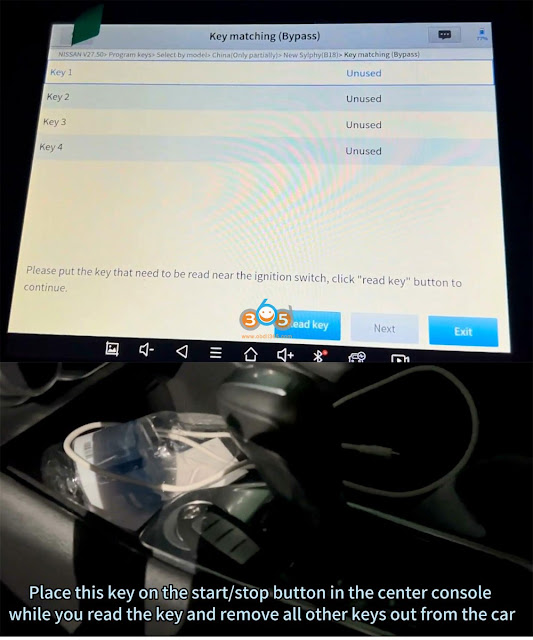
Xtool Program 2021 Nissan Sentra Smart Key Bypass PIN 13

Read key 1 ok.

Place another key on the start/stop button in the center console while you read the key and remove all other keys out from the car
Read key 2 ok.
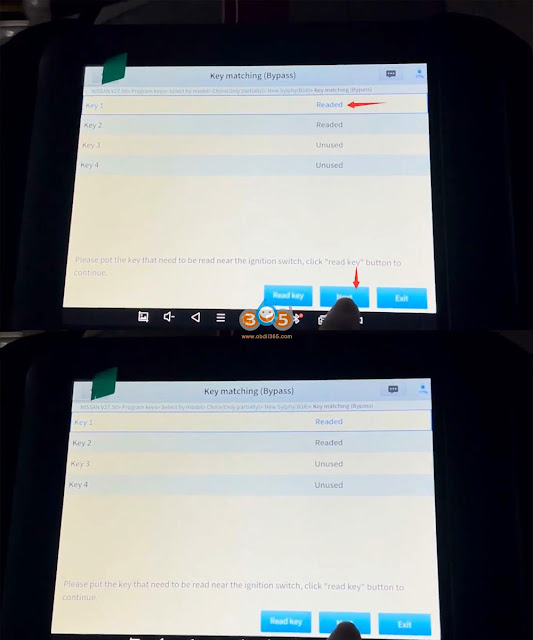
Xtool Program 2021 Nissan Sentra Smart Key Bypass PIN 14
Press Next

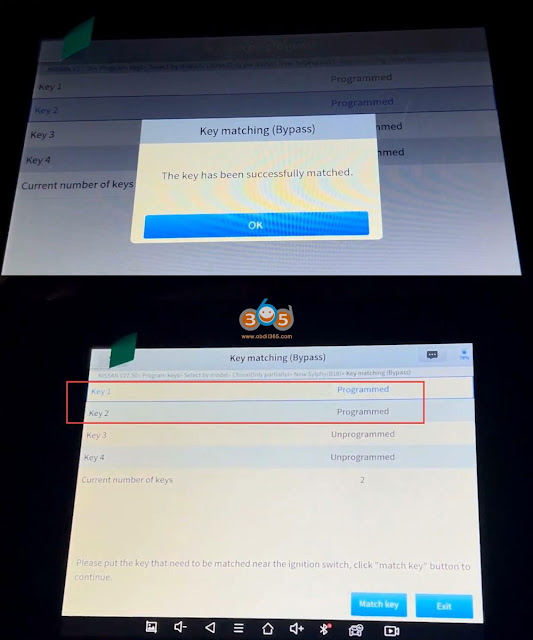
Select Key 1, press Match key and put the key near the ignition switch
The key has been successfully matched.

Xtool Program 2021 Nissan Sentra Smart Key Bypass PIN 15

Select Key 2, press Match key and put the key near the ignition switch.

The 2nd key has been successfully matched
Xtool Program 2021 Nissan Sentra Smart Key Bypass PIN 16

Wednesday, March 20, 2024

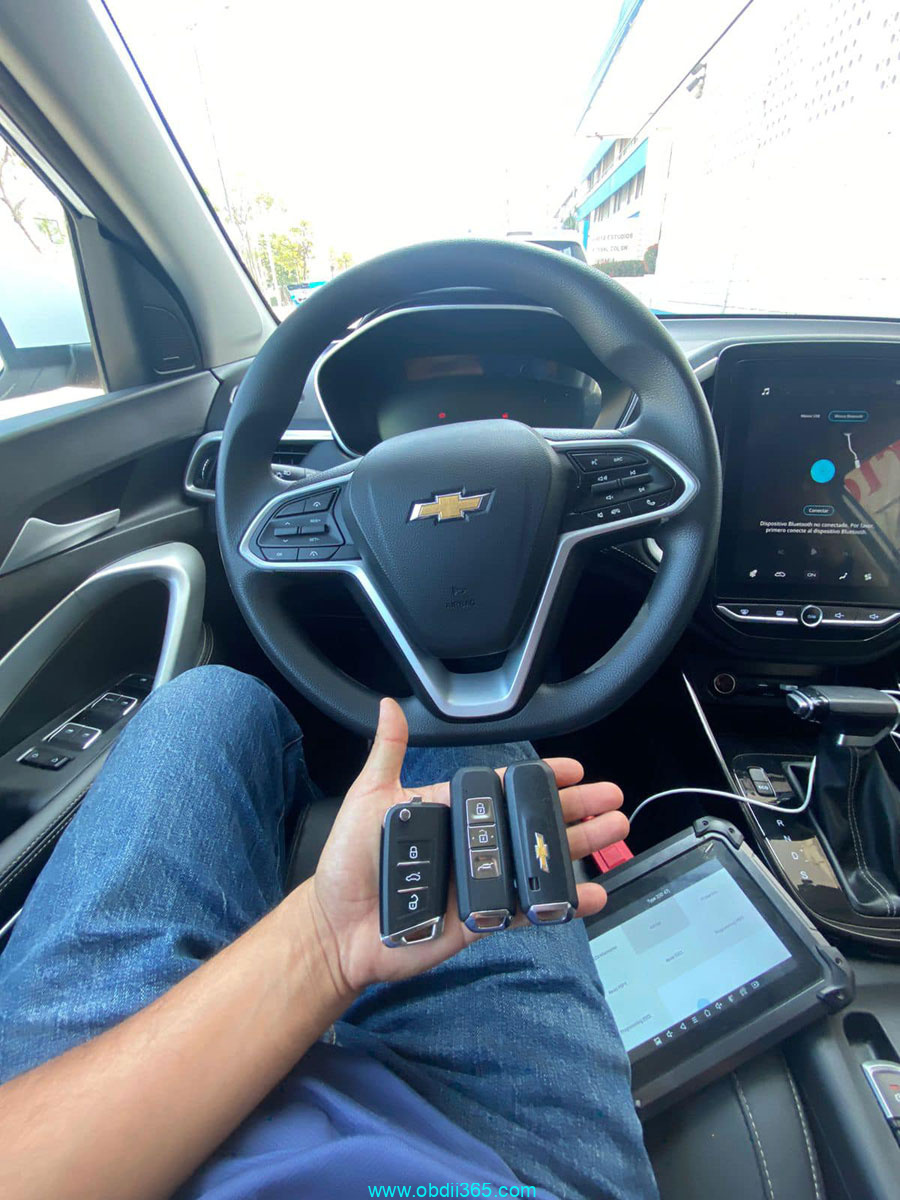
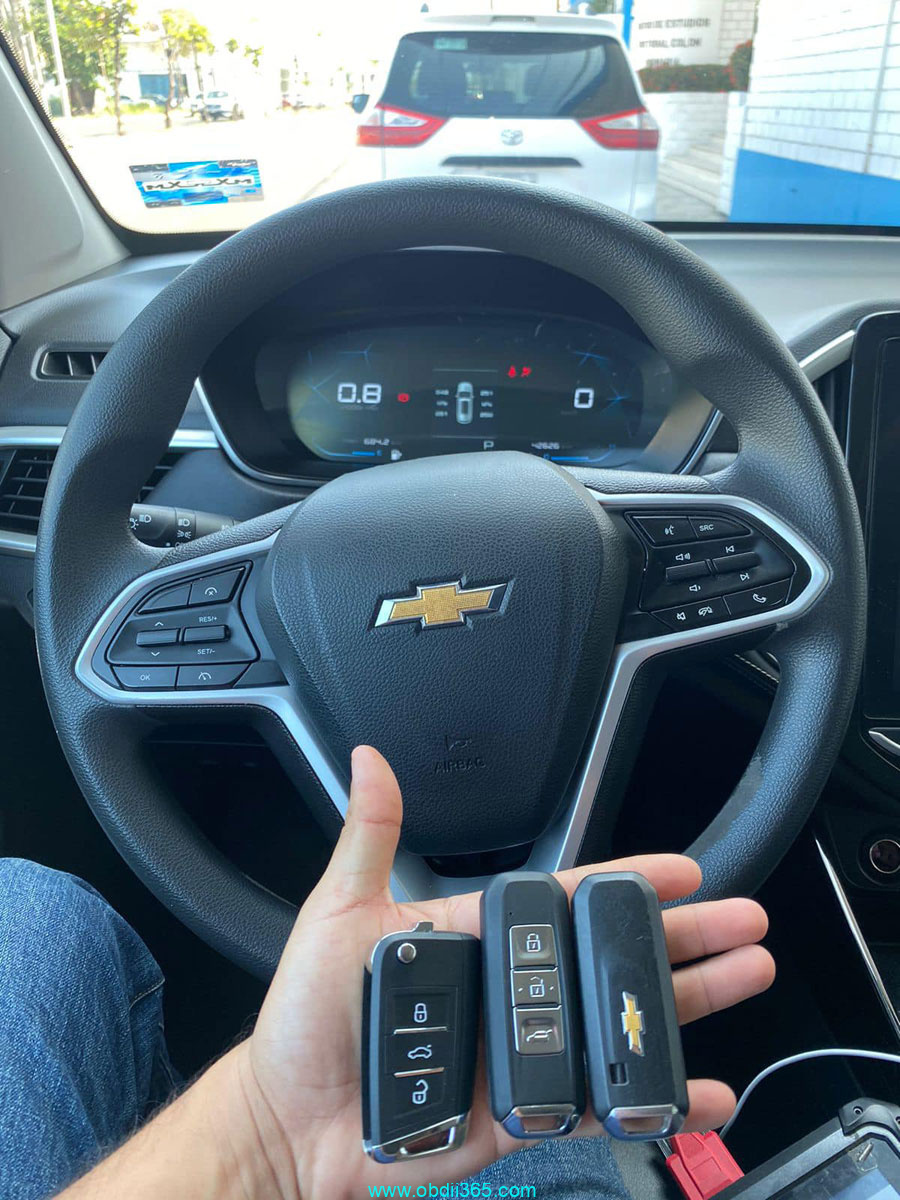
Program Chevrolet Captiva 2023 Smart Key Xtool AutoPad

 Program Chevrolet Captiva 2023 key successfully.

Generate key with xhorse mini key tool.

Don’t be surprised if key is generated from the Chinese brand BAOJUN.

Program Chevrolet Captiva 2023 Smart Key Xtool  1

This option generates Captiva 2023 ID47 key successfully.

Program Chevrolet Captiva 2023 Smart Key Xtool  2

Program key with Xtool Autopro pad. It does not ask for code.
Autel KM100 can also do without problems.

Program Chevrolet Captiva 2023 Smart Key Xtool  3

Program Chevrolet Captiva 2023 Smart Key Xtool  4

Xtool X100 PAD3 vs D9 Pro vs Xtool X100 MAX

 What’s the difference among X100 X100 MAX, Xtool X100 PAD3 and Xtool D9 Pro tools?


Check the table comparison below:

ItemXtool X100 PAD3Xtool D9S ProXtool X100 MAX

Operating systemAndroid 5.1.1Android 10.0Android 10
Screen8 inch, 1024*7689.7” Touch Screen, 1024*768 Resolution9.7-inch capacitive, 1024×768 resolution
ProcessorQuad-Core 1.8Ghz processorQuad-Core 1.8GHz CPU ProcessorQuad-core processor 1.8GHz
RAM2GB4G4G
ROM64GB128G128G
Battery10,000mAh12800mAh*3.7V12800mAh(6400mAh*7.4V)
ConnectionUSB/ BluetoothUSB/Wi-Fi/BluetoothUSB/Wi-Fi/Bluetooth
Camera8MP camera8MP camera8-megapixel autofocus rear camera
VCIX-MVCIX-MVCI
CAN FDYesYes
DoIPYesYes
Full system diagnosticsYesYesYes
Bi-Directional Control (active test)YesYesYes
ECU CodingYesYesYes
ECU ProgrammingYes, BMW, Benz, VW, Audi, SKODA online programming and Ford, Mazda offline programmingYes, BMW, Benz, VW, Audi, SKODA online programming and Ford, Mazda offline programming
Special functions38+42+42+
Refresh Hidden FunctionsYesYesYes
VAG Guided functionsYesYesYes
Autovin/AutoscanAutoVinYesYes
Topology MappingYesYes
Multi-languageYesYesYes
Update2 years free update3 years free update2 years free update
Support Russian carsYesYesYes
Supports Malaysian carsYesYesYes
Support Brazilian carsYesYesYes
Compatible with KC501/KC100YesYesWith KC501 in default, supports KC100
VideoscopeWith XV100With XV100With XV100
Supports M821YesYesYes
Supports M822YesYesYes
Support KS-01, KS-02, SK1 emulatorsYesYesYes
Supports ADAS calibrationYes, need equipment

In sum:

D9 Pro/D9S Pro share same diagnostic function as X100 MAX. Both have X-MVCI J2534 for VAG/BMW/Benz online programming. X100 MAX comes with KC501 programmer in default. You need need to buy KC501 separately. If need a diagnostic machine, go for D9 Pro. If need a IMMO tool, go for X100 MAX.


X100 MAX is the upgrade version of x100 pad3. X100 Max has better processor, larger screen, larger battery and larger storage. PAD3 does not support DoIP and CAN FD protocol, X100 MAX does.  PAD3 also needs to purchase KC501 programmer separately.  PAD3 does not support Topology and ECU programming (does not have X-MVCI).


https://www.obdii365.com/service/xtool-x100-max-vs-x100-pad3-vs-d9-pro.html