Wednesday, May 10, 2023

Xtool IP616 vs IP819 vs D8 vs D9

 Here comes the table comparison among the most popular Xtool diagnostic tablets, Inplus series IP616, IP819, D7, D8 and D9.

Xtool InPlus IP616Xtool D7


Xtool InPlus IP819Xtool D8


Xtool D8 BT


Xtool D9


Screen & Battery7″ Display, 5000 mAh7″ Display, 4000 mAh7″ Display, 5000 mAh8″ Display, 10,000 mAh8″ Display, 10000 mAh9.7″ Display, 10000 mAh
All Systems DiagnosisYesYesYesYesYesYes
Bi-Directional ControlN/AYesYesYesYesYes
Special Functions31+28+31+31+31+42+
Advanced FeaturesN/ACrankshaft Relearn, Idle Relearn, Fuel Trim Reset, Alcohol Content Reset, SWS Calibration, Yaw Rate Sensor Calibration, ABS Initialization, Transmission Oil Counter Reset, Trans Adaptive Values Reset, Pilot Quantity Learning, VIN Relearn, HVAC Cali.etc
Flash Hidden FunctionsFlash Hidden Functions for VAG carsN/AFlash Hidden Functions for VAG carsFlash Hidden Functions for VAG carsFlash Hidden Functions for VAG carsFlash Hidden Functions for VAG cars
ECU CodingECU coding for VAG carsN/AECU coding for VAG carsECU coding for VAG carsECU coding for VAG carsECU coding for VAG cars
OBDII, EOBD, CAN FD, DoIPOBDII, EOBD, CAN FDOBDII, EOBDOBDII, EOBD, CAN FDOBDII, EOBD, CAN FDOBDII, EOBD, CAN FDOBDII, EOBD, CAN FD, DoIP
Work with key programmers KC100/KC501YesN/AYesYesYesYes
Work with EndoscopeN/AN/AN/AYesYesYes
Memory2G+32G2G+32G2G+32G2G+32G2G+32G2GB+ 128GB
Free Software UpdatesLifetime free update3 Years Update3 Years Update3 Years Update3 Years Update3 Years Update
VCIN/AN/AN/AWireless VCIWireless VCIDoIP VCI
Live Data Graphing


Export Live Data as CSVExport Live Data as CSVExport Live Data as CSV; 8-In-1 Graphing; Graph up to 8 sensors individually on the same screen, etcExport Live Data as CSVExport Live Data as CSVExport Live Data as CSV; 8-In-1 Graphing; Graph up to 8 sensors individually on the same screen, etc


Sunday, April 23, 2023

How to Activate and Update Xtool D9 Pro?

 The Xtool D9 Pro obd2 diagnostic scanner hardware is exceptionally well designed and the build quality is solid. Every operation is so much faster. Also, the network topology view really makes it easier to visualize and understand the complete system under inspection.  Here is the instruction to register, activate, update and self-test Xtool D9 Pro scanner.


How to Register and Activate Xtool D9 Pro?

how to activate xtool d9 pro 1

Power on Xtool D9 Pro

how to activate xtool d9 pro 2

Select device language

Multi-language (14) optional: send the Serial Number(S/N) to change English to Spanish, Portuguese, French, Japanese, German, Polish, Russian, Italian, Korean, Dutch, Swedish, etc.

how to activate xtool d9 pro 3

Connect Xtool D9 Pro with WiFi

how to activate xtool d9 pro 4

Come to Welcome interface, press Get Started

how to activate xtool d9 pro 5

Register with email
Accept user agreement
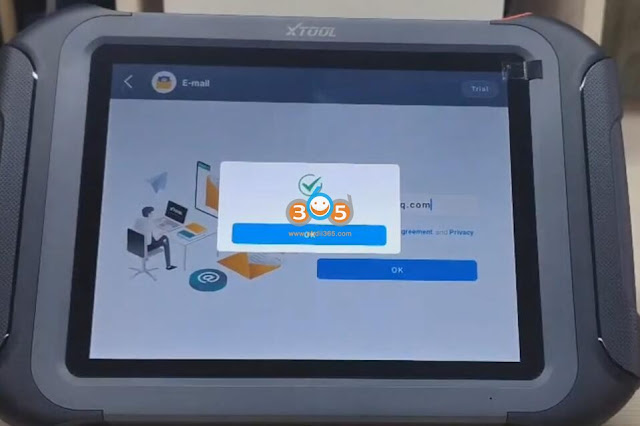
how to activate xtool d9 pro 6

Scanner is activated.


How to Update Xtool D9 Pro?
how to update xtool d9 pro 1

In Home menu, select Diagnosis App

how to update xtool d9 pro 2
Go to Updates

You can select single software or all software to update.

how to update xtool d9 pro 3

how to update xtool d9 pro 4

how to update xtool d9 pro 5


Xtool D9 Pro Self-Test

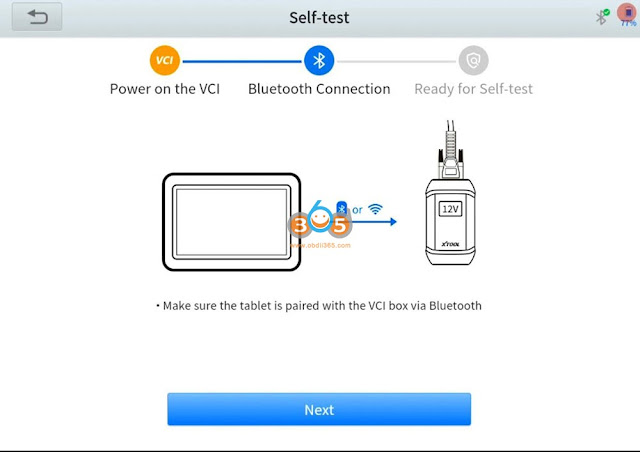
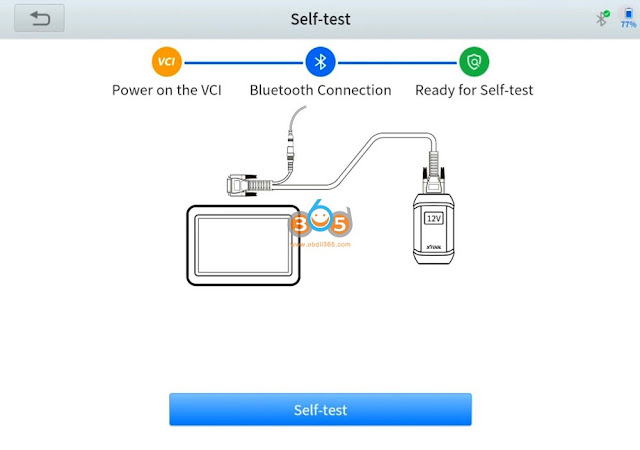
Go to Settings->Self-Test->Ready to Self-Test

xtool d9 pro self-test 1

Connect Xtool VCI with tablet and power VCI with 12V power supply
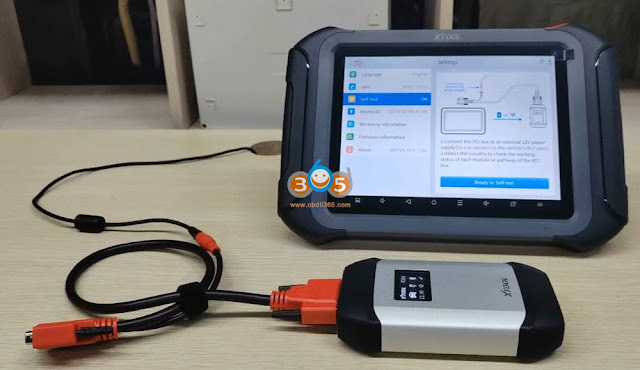
xtool d9 pro self-test 2

xtool d9 pro self-test 3

Pair D9pro with VCI via Bluetooth

xtool d9 pro self-test 4

xtool d9 pro self-test 5

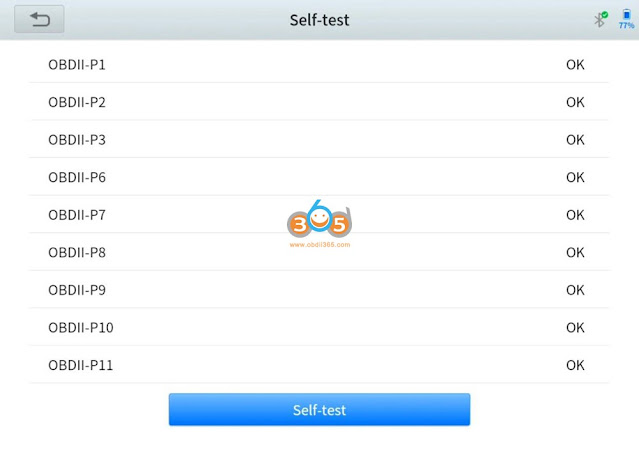
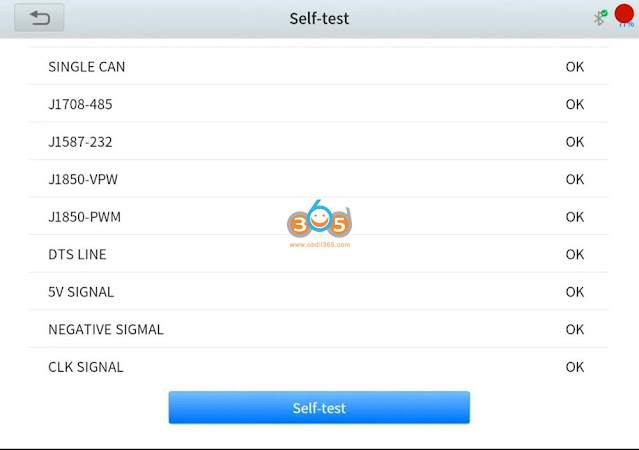
Start self-test

xtool d9 pro self-test 6

xtool d9 pro self-test 7


Xtool D9 Pro Car List

XTOOL D9Pro car diagnostic scanner works on more than 85+ US domestic, European, and Asian makes and models, more than 10000 cars, the extensive vehicle coverage can provide you with almost every diagnostic option a mechanic could need. With a multilingual menu, you can easily switch between languages, allowing mechanics to avoid language barriers and focus on their vehicle data.

Aisa: Compatible with (JAPAN) Acura, Daihatsu, Honda, Infiniti, Isuzu, Jpisuzu, Lexus, Mazda, Mitsubishi, Nissan, Nissan GTR, Scion, Subaru, Subaru, Suzuki, Tlisuzu, (KOREA) Daewoo, Hyundai, KIA, Samsung, Ssangyong; (CHINA) Baic, Beijing, Changan, Changan-Ford, Changcheng, Changhe, Chsuzuki, DF Peugeot, DF Honda, DF Nissan, DF XK, Flyer,BYD, Fukang, Futian,Foton, Geely, Gonow, GZ Honda, Hafei, Haoqing, HC BMW, Hmada, Huachen, Isuzu, JMC, Jacty, Jianghuai, Jiao, Jinlong, Joylong, Lifan, Liuwel-TY, Luxgen, NJ Fiat, Qirul-TY,chery, Qoros, Saicmg, Spark-TY, Trumpchi GAC, Weili, Xiaokang Dongfeng, Xili,Faw Tianjin, Xinkai, YQ Mazda, Zhongshun, Zhongtai, Zotye, Zhongxing (MALAYSIA) Perodua, Proton, (IRAN)MVM

Europe:Compatible with Vaz, Porsche, Maserati, BMW, Seat, VW, Audi, Citroen, Landrover, Smart, Renault, Skoda, Sprinter, Land Rover, Benz, Fiat, Opel, Volvo, Peugeot, Ferrari, Saab, Gaz, DR

USA: Compatible with Gm, USAFord, Chrysler, Willy; Australia: Compatible with Austford, Holden; Brazil: Compatible with BXFiat, BXGM


Detail function and car list, check official website: www.xtooltech.com


Xtool D9Pro Export/Import Data via USB

In Home menu, pull down main screen, Select Change the device to USB

Xtool D9Pro Export/Import Data via USB 1

Xtool D9Pro Export/Import Data via USB 2

Select use USB for File Transfer

Xtool D9Pro Export/Import Data via USB 3

Then you can transfer file from tablet to PC.


Xtool D9 Pro Review


Pros:

  • The D9-Pro appears to stand out in having the highest number of Special Service Functions capabilities, along with the longest update terms of any other competitor in this class of tools. In addition, I continue to purchase their products because they provide the most solid and extensive features, update policy, and warranty, but most importantly customer service, in comparison to their competitors.
  • It does everything and more than most people will need.
  • it does a great amount of diagnostics, very informational, lots of adapters!
  • It’s easy to use and very fast. Diagnostics updates are easy to do and really quick. Much easier tool to use than Snap-on Modis.
  • The software feels light-years ahead of the Autel MS906.
  • the network topology view really makes it easier to visualize and understand the complete system under inspection.
  • with 3 years of free software upgrades (reasonable annual renewal rate after that)
  • It’s live data is very close to what I get from my factory scanner without having to have a computer in the car during a test drive.
  • The battery last a long time.
  • I like the bluetooth connection and it really doesn’t seem to lag at all.
  • It goes more in-depth with testing and calibrating to help you diagnose the cars more efficiently.
  • The tech support has been superb and has assited with an inquires. They are very efficient and respond quickly to any concerns.
  • D9Pro is just as good as the THINKTOOL PRO-S in both form and function.


Cons:

Does not allow for graphing of more than one pid at a time.

What is the difference between xtool d9 and d9 pro?

 What is the difference between xtool d9 and d9 pro?


Here is a table comparison:

FeatureXtool D9Xtool D9 Pro
Car models70+70+
Diagnostic systems supportedEngine, Transmission, ABS, Airbag, etc.Engine, Transmission, ABS, Airbag, etc.
Special functionsOil reset, EPB reset, SAS calibration, DPF regenerationOil reset, EPB reset, SAS calibration, DPF regeneration, ECU coding and programming
Touchscreen displayYesYes
Live data streaming and graphingYesYes
Built-in WiFiNoYes
Software updatesVia USBVia WiFi
Storage and memory8GB storage, 1GB RAM16GB storage, 2GB RAM
The Xtool D9 and D9 Pro have many similarities, including their wide compatibility with over 70 car models and their support for a range of diagnostic systems. However, the D9 Pro has some additional features, such as support for ECU coding and programming, which make it a more versatile and powerful diagnostic tool. It also has double the storage and memory capacity of the Xtool D9 and can receive software updates via WiFi, which is more convenient than using a USB.

Monday, February 20, 2023

Xtool D8 BT, D9 and D9 Pro Comparison

 What is the difference among Xtool D8 BT, D9 and D9 Pro diagnostic scanner?


First of all, check a table comparison here:

ItemXtool D8 BTXtool D9Xtool D9 Pro
Screen8 inch9.7 inch9.7 inch
Processor1.8Ghz quad-core1024×768Quad-Core 1.8GH
Storage64GB2GB+ 128GB2GB RAM & 128GB ROM
Operating SystemAndroid 5.1.1Android 10.0Android 10.0
Display resolution‎1024 x 7681024×7681024×768
Battery10,000 mAh built-in battery10000mAh10000m Ah
ConnectionUSB, WiFi, BluetoothUSB, WiFi, BluetoothUSB, WiFi, Bluetooth
CAN FD ProtocolYes, Compatible with 2020MY and later BUICK / CHEVROLET / CADILLAC / GMC / HOLDEN, etc.


Yes, Compatible with 2020MY and later BUICK / CHEVROLET / CADILLAC / GMC / HOLDEN, etc.


Yes, Compatible with 2020

MY and later BUICK

CHEVROLET  CADILLAC

GMC HOLDEN, etc.


DoIP protocolYes Yes


VCIWireless VCIXtool DoIP VCIXtool DoIP VCI J2534
Full system diagnosticYesYesYes
AutoScan & AutoVINAutoVINYesYes
Full Bi-Directional Controls


YesYesYes
ADAS CALIBRATIONYesYesYes
Special Functions38+ Special Functions42+ Special Functions42+ Special Functions
Key ProgrammingYes with KC501Yes with KC501Yes with KC501
ECU CodingVW / AUDI / Å koda. Ecu codingVW / AUDI / Å koda. Ecu codingBMW / VW / AUDI / Å koda / BENZ ecu coding
VAG Guided FunctionYesYesYes
Flash Hidden FunctionsYesYesYes
ECU ProgrammingNoNoBMW Benz VW Audi SKODA online ECU programming,

Program Ford Mazda Programmable Module Installation (PMI) offline

Topology MappingNoYesYes
Live Data GraphingExport Live Data as CSVExport Live Data as CSV; 8-In-1 Graphing; Graph up to 8 sensors individually on the same screen, etcExport Live Data as CSV;

8-In-1 Graphing;

Graph up to 8 sensors individually on the same screen, etc

EndoscopeYes, XV100, package not includedYes, XV100,

package not included

NON-OBD2 connector KitYesYesYes
Update3 years free update3 years free update,

$258 per year later

3 years free update,

$358 per year later


The difference between the D9 and the D9 Pro is:

  • D9 Pro supports ECU CODING for BMW / VW / AUDI / Å koda / BENZ…. The D9 only supports the VW / AUDI / Å koda.
  • D9 Pro supports ECU PROGRAMMING for BMW/ VW / AUDI / Å koda / BENZ / FORD (Offline) / MAZDA (Offline)…. the D9 does not.
  • The update fee for the D9 is $258, and the update fee for the D9 Pro is $358 after the 3 years of free updates.


The difference between D9 Pro and D8/D8BT is: 

The X-Tool D9 Pro kit is the top of the range tool by X Tool, and will let you do pretty much everything the garage & Main Dealer workshop will do. It is one of the most advanced Scan Tool & Coding kits I have ever worked with.

D9 screen is roughly 1″ larger than the D8. Both the D8 and D9 will cover all main systems like engine, abs, airbags, transmission, steering, brake and so much more. They can both do Auto VIN, Read ECU Info, Read codes, Clear Codes, Read Live data Freeze Frame Data, Actuation/bi directional tests. Coding & guided function. The D9 PRO can do ECU coding & programming For special/service functions, both the D8 & D9 will cover the following:

OIL LIGHT RESETS EPB

– ELECTRONIC PARKING BRAKE SAS

– STEERING ANGLE SENSOR DPF

– DIESEL PARTICULATE FILTER FORCE REGENERATION BMS

– NEW BATTERY REGISTRATION

THROTTLE RESET

TPMS RESET

INJECTOR CODING

ABS BRAKE BLEEDING

KEY PROGRAMMING

GEARBOX MATCHING

SUSPENSION CALIBRATION

WINDO INITIALISATION

SEAT CALIBRATION

ECU CONFIGURATION

A/F SETTINGS

START.STOP SYSTEM RESET

AIRBAG REPAIR

LANGUAGE CHANGE

INSTRUMENT CLUSTER

MILEAGE CORRECTION

TRANSPORT MODE

TYRE UPGRADES

GEAR LEARNING

POWER BALANCE EEPROM

ELECTRONIC PUMP ACTIVATION

ADAS CALIBRATION


The following functions are only supported by the D9 Pro:

SPEED LIMIT

CLUTCH ADAPTION

SRS

ADBLUE RESET

EGR RELEARN

FRM RESET

NOX RESET

VIN

VGT RELEARN

HV BATTERY

A/C RELEARN

RAIN/LIGHT SENSOR

RESET CONTROL UNIT

ODOMETER READ


Both the D9 and D9 Pro are both wireless Bluetooth. The D9 Pro comes with ECU programming capabilities on VW, Mercedes, BMW, and offline ECU programming on Ford, Mazda while XTOOL D9 does not.
A few things important to note:
  • If you don’t need ecu programming function, you don’t need to update D8 to D9 because they are similar.
  • The D8BT (bluetooth) can NOT be wired in the event the BT fails. However, the D9 CAN be wired if the BT fails.
  • ECU Programming is available on the D9 but limited to VW/Audi/Skoda. ECU Programming on the D9 Pro is expanded to BMW, Mazda, Benz, Ford, VW/Audi/SKODA.
  • D9/D9 Pro has the topology scanning to see the network diagram.
http://blog.obdii365.com/2023/02/20/xtool-d8-bt-vs-d9-vs-d9-pro/