Tuesday, May 18, 2021

Renault Duster 95040 All Keys Lost by Xtool X100 PAD2/PAD3

 How-to: Renault Duster 2010-2013 all keys lost transponder key programming by Xtool X100 Pad2 or X100 PAD3 (PAD Elite) via eeprom.


Step 1: Read Pin Code

xtool-x100-pad3-renault-duster-akl-1

Remove Renault Duster BCM module and disassemble the module

xtool-x100-pad3-renault-duster-akl-2

Locate chip ic 95040

xtool-x100-pad3-renault-duster-akl-3

xtool-x100-pad3-renault-duster-akl-4

Desolder the Eeprom chip into xtool adapter

xtool-x100-pad3-renault-duster-akl-5

Connect the adapter with xtool Eeprom adapter (25XXX)

xtool-x100-pad3-renault-duster-akl-6

xtool-x100-pad3-renault-duster-akl-7

Then connect Eeprom adapter with xtool x100 pad3
In x100 pad, select Renault ->Immobilizer->Duster->2010-2013->Read pin code->Read Eeprom (95040)

xtool-x100-pad3-renault-duster-akl-8

xtool-x100-pad3-renault-duster-akl-9

xtool-x100-pad3-renault-duster-akl-10

Eeprom adapter communication indicator flashes

xtool-x100-pad3-renault-duster-akl-11

xtool-x100-pad3-renault-duster-akl-12

Read data success, save data

xtool-x100-pad3-renault-duster-akl-13

Calculate pin code success

Take a screenshot of the Pin Code.


Step 2: Program Key


Solder the eeprom chip back to BCM board and install BCM module

xtool-x100-pad3-renault-duster-akl-14

xtool-x100-pad3-renault-duster-akl-15

Feed with power supply and ignition equipments
Select Renault ->immobilizer->Duster->2010-2013->Program key
Switch ignition off, remove the key from the ignition switch

xtool-x100-pad3-renault-duster-akl-16

xtool will ask to input pin code to access
Manual enter pin code in step 1 and confirm

xtool-x100-pad3-renault-duster-akl-17

Insert a key to be programmed and turn the ignition on
Wait for 10 seconds

xtool-x100-pad3-renault-duster-akl-18

Program key success, select not to program another key
Turn the ignition switch off
Wait for 10 seconds

xtool-x100-pad3-renault-duster-akl-19

Program key finished.

Test the new key.

Done.

www.obdii365.com


http://www.key-programmer.org/2021/05/19/program-renault-duster-95040-all-keys-lost-by-xtool-x100-pad2-pad3/

Saturday, February 20, 2021

How to Solve Xtool Keeps Giving Network Error?

 Problem: 

I received the Xtool PS90 tablet. When register to activate the scanner, it kept giving network error but network is working my account keeps informing me i signed in but the tablet says not its frustrating any software i can download to fix?

xtool-network-error-1

xtool-network-error-2


Solution:

Check network connection. If network connection has no problem. The error may cause by the low App version.

Delete older Xtool App and install latest version. Problem will be solved.

The solution fits other Xtool products, X100 PAD, X100 PAD2 etc.


Wednesday, January 20, 2021

Xtool A80 Pro, A80 and X100 PAD3 Comparison

 Question: Any difference among the Xtool A80 Pro (H6 Pro), A80 (H6) and x100 pad3 (X100 PAD Elite)?


First of all, check the table comparison below:

Product nameXTOOL A80 ProXTOOL A80 H6XTOOL X100 PAD3
IMG 

Price$1,199$779$959
All system  diagnosisYes (supports action test+ data stream)Yes (supports action test+ data stream)Yes (read and clear fault code)
Immobilization/ key programmingYesYesYes
Odometer AdjustmentYesYesYes
ECU programmingYesNoNo
Brush hidden functionYesNoNo
EEPROM AdapterYesYesYes
Service/Maintenance LightYesYesYes
EPB (Electric Parking Brake)YesYesYes
Throttle RelearnYesYesYes
Window initializationYesYesYes
Tire Pressure ResetYesYesYes
ABS BleedingYesYesYes
Gearbox MatchYesYesYes
BMS ResetYesYesYes
HeadlightYesYesYes
Air SuspensionYesYesYes
Steering Angle Sensor AdjustmentYesYesYes
Crankshaft ResyncYesYesYes
DPFYesYesYes
Injector CodingYesYesYes
Airbag RepairYesYesYes
CylinderYesYesYes
Seat ConfigurationsYesYesYes
Electronic Pump ActivationNoNoYes
Disable TransportationNoNoYes
Performance Tire UpgradeNoNoYes
Hardware comparison:   
Operating SystemAndroidAndroidAndroid 5.1.1
CPUQuad core 1.8GHzQuad core 1.8GHzQuad core processor 1.8GHz
Storage space64GB32GB64GB
RAM2GB2GB2GB
Battery10,000mAh10,000mAh10,000mAh
Resolution1024*768P1024*768P1024*768P
Screen size8 inch8 inch8 inch
PortsHDMI, DCHDMI, USB3.0USB3.0,DC charging port,DB15 interface, MINI HDMI
CommunicationWiFi / BluetoothWiFi / BluetoothWiFi / Bluetooth
Camera8.0 Megapixel8.0 Megapixel, AF with a flashlightRear camera, 8 million pixels, with flash autofocus
UpdateFree update via WiFi2 years free update via WiFi2 years free update via WiFi
LanguageEnglish, German, French, Spanish, Polish, Italian, Japanese, Portuguese, Russian, KoreanEnglish, German, French, Spanish, Polish, Italian, Japanese, Portuguese, Russian, KoreanEnglish, German, French, Spanish, Polish, Italian, Japanese, Portuguese, Russian, Korean
Technical supportExpert service teamExpert service teamExpert service team


Summary:

The language, software update, function among them are similar.

A80 Pro (H6 Pro) vs. A80 H6:

1.A80 Pro supports online/offline ECU programming and brush hidden function while A80 H6 doesn’t support.

xtool-a80-pro-hidden-function

Note: “Brush hidden function” means that you can enter this function to activate all options are hidden in the original configuration such as automatic locking, cruise at fixed speed, one key automatic lifting window, etc.


2.The VCI box between them is different.

A80 Pro vs. X100 PAD3 (X100 PAD Elite):

1.A80 PRO supports all system diagnosis, action test and data stream but X100 PAD Elite only can read and clear fault code.

2.A80 Pro can perform ECU programming online or offline for part of car models and brush hidden function while X100 PAD3 cannot.

3.XTOOL X100 PAD Elite adds more special functions than other XTOOL diagnostic tools: Electronic Pump Activation, Disable Transportation and Performance Tire Upgrade. Besides, it supports more car models for key programming.


https://www.obdii365.com/service/xtool-a80-pro-vs-a80-vs-x100-pad3.html

Sunday, January 3, 2021

Can Xtool KC501 Program VVDI or CGDI Mercedes Key?

 Question: Can I use vvdi key or cgdi Mercedes key and program it with Xtool kc501 ???


Answer:

Both Mercedes BE key and BGA key from VVDI / CGDI can be used to program with Xtool KC501.

Here are the source of Mercedes BE key from Xhorse:

https://www.obdii365.com/wholesale/xhorse-vvdi-be-key-for-vvdi-mb-tool.html

BGA key from Xhorse:

https://www.obdii365.com/wholesale/benz-fbs3-mb-bga-keyless-go-key-433mhz.html


and Mercedes BE key from CG:

https://www.obdii365.com/wholesale/cg-key-for-cgdi-mb-key-programmer.html

BGA key from CG:

https://www.obdii365.com/wholesale/mb-fbs3-bga-keylessgo-key-315mhz.html

Good to know:

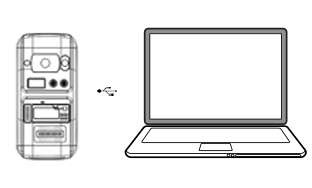
Usually, Xtool KC501 is connected to Xtool PAD to program Mercedes Benz key. If no Xtool PAD like X100 Pad3, you can use Xtool KC501 as a programmer to plug into a computer, then to read out EIS data and load it into VVDI MB / CGDI MB to generate the key.


This article is on how to read EIS data and then to add new key using Xtool X100 Pad3 + KC501.


And look at the image which shows Xtool KC501 connected to a PC:

xtool-kc501-write-key-1


Guide on generate key and read key chip using Xtool KC501:

Put the key or key chip into the slot accordingly, connect to PC via USB, and open the software on PC

xtool-kc501-write-key-2

xtool-kc501-write-key-3


Info: Read the key information

Unlock: Unlock the key

Generate: Generate the key according to the chosen car brand


Select the car brand and tap the “generate” button, key will be generated.

xtool-kc501-write-key-4


Can read the data of the current key chip.

xtool-kc501-write-key-5

xtool-kc501-write-key-6

xtool-kc501-write-key-7


Enjoy!


www.obdii365.com

Thursday, December 24, 2020

How to use VAG Access Code for 4th 5th IMMO MQB All Keys Lost?

With Xtool VAG Point Code, Xtool X100 PAD2X100 PAD2 PRO / X100 PAD3 will be granted for calculation access via OBD2 for VAG 4th & 5th immobilizer systems and MQB-platform, for all keys lost (AKL) key programming i.e golf 7 2013. NO EEPROM REQUIRED!


During this process,  internet connection is required, so that Xtool Pad is able to connect to VAG servers and perform calculation. After the calculation is done, your tablet will have unlimited access to that same vehicle.


After ordered from obdii365.com, you will receive an email with your activation code. Keep this email handy, because you are supposed to enter the code at the time of programming.


Xtool VAG Point Code Operation Guide:

Tap ” the vehicle system”:

1). VW 4th Immobilizer System

xtool-vag-access-code-1


2). Audi 5th Immobilizer System

xtool-vag-access-code-2


xtool-vag-access-code-3


3). Audi MQB Platform
xtool-vag-access-code-4


  1. Tap ” Online Mode”.

xtool-vag-access-code-5


  1. Receive a prompt “This password needs to be paid to get it, please contact your local dealer or Xtool. Just input your code.

xtool-vag-access-code-6


  1. Upon inputting a valid code, the calculation will start. It will take 30 seconds to 3 minutes.

xtool-vag-access-code-7


  1. If the calculation succeed, you will receive a message “Get data successfully!”
    xtool-vag-access-code-8

If your internet was interrupted during the online calculation, you will receive a error screen (shown as below). Don’t worry, your VAG Point Code is still available to use if the calculation fails. Just have the second try to start the calculation using the same code.
xtool-vag-access-code-9


  1. Upon getting a message “Get data successfully!”, you will be able to now add a key or perform all keys lost for VAG 4th / 5th IMMO & MQB immobilizer system.


Enjoy!


Xtool Point Code is only for 10usd here:

https://www.obdii365.com/wholesale/xtool-mqb-point-card.html

Wednesday, December 23, 2020

Xtool Updated Audi A6 A7 A8 5th IMMO All Keys Lost

 Xtool Tech published new Audi software V28.03 adding Audi 5th generation key programming function via OBD.


Add all smart key lost network automatic calculation function
All smart key lost via OBD covering A6 A7 A8

This update can be applied to Xtool X100 PAD3 (X100 Pad Elite) and Xtool X100 PAD2

*Require KC501 or KC100 adapter to work with.

xtool-updated-audi-5th-immo


Tuesday, December 1, 2020

Solved! Xtool X100 Pro2 Update System Error

 Here offer the solution for XTOOL X100 Pro2 “System File Error!” after updating. This is the problem that has been asked by many customer recently.

xtool-x100-pro2-system-error


Attach one customer’s feedback as below:

i have a tech problem with X100 pro2.

I updated the system, and when i tried to use the tool it showed “!!! System File Error!!!”.

I was talking with a mexican guy who had a similar problem, and he told me that i need the backup of the original folders that are found in the memory of the tool, so i think that would solve my problem.


obdii365.com engineer replied:

There is a problem with the files in the card, Please format the device and upgrade it again.

XTOOL X100 Pro2 update video:

https://youtu.be/bLbZDLO5_mo


Finally, the customer told us that he followed our advice to do and “It worked nicely. Thank you for your time!”


If you have the same problem above, please try to solve it with the method our technician provided.

Hope it helps!

Monday, August 3, 2020

Xtool Adds GM 2018 Up Security Code Reading

Xtool tech programmers (xtool x100 pad2, x100 pad3, autopropad, ps90  etc) updated GM security password reading models after 2018 in July 2020.

GM Key Programming Upgrade
Add read password function (after 2018)
For GM version V27.80
Model   Year
Verano 2018-
Regal 2018-
Lacrosse Lacrosse NAO 2018-
Excelle 2018-
Envision 2018-
Cruze 2018-
Malibu 2018-
Equinox 2018-
Trailblazer 2019-
Cadillac CT6 2018-
Cadillac XT4 2018-
Cadillac XT5 2018
Cadillac XT6 2018-

xtool-update-gm-immo-july-2020

Thursday, July 30, 2020

Xtool KC501 Mercedes IR Key Programming Car List

The Xtool KC501 chip and key programmer adds Mercedes Benz Infrared key function list on July 30th, 2020.

Supports following Mercedes IR key programming:
Model Years
A Series 2005-2013
B Series 2005-2014
C/CLK Series 2006-2014
CLA Series 2013-2016
CL Series 2006-2013
CLS Series 2006-2013
E Series 2005-2015
G Series 2015
GL/CLG Series 2006-2014
GLC/GLK Series 2008-2015
M/ML Series 2006-2013
R Series 2006-2017
S Series 2006-2017
SLK/SLC Series 2006-2016
xtool-kc501-adds-benz-ir-key

Note: KC501 is not compatible with x100 pad2, it should be used with xtool x100 pad3, i80, auto pro pad.

Tuesday, July 28, 2020

Xtool X100 PAD3 Adds Toyota CHR 2019 Spare Key Success

Today I have duplicated a spare Toyota CHR 2019 smart Key with xtool X100 pad3 successfully.

Select Immobilizer->Toyota->Smart Key System->Prox 3 (proximity)->Add a smart key
xtool-x100-pad3-toyota-chr-2019-add-key-1

xtool-x100-pad3-toyota-chr-2019-add-key-2

xtool-x100-pad3-toyota-chr-2019-add-key-3
Put original key close to the Start button
xtool-x100-pad3-toyota-chr-2019-add-key-4
Put the new key close to the Start button
xtool-x100-pad3-toyota-chr-2019-add-key-5
Follow x100 pad3 prompts until succeed.
Test the new key.
xtool-x100-pad3-toyota-chr-2019-add-key-6
Done.