Xtool tech released 2019+ Toyota 8A/4A Smart Key Programming (Via key emulation & generation) function on Oct. 2022. Check Instruction below.
Tools you need
- Xtool tablets (X100 pad3, x100 pad elite, A80/H6 pro etc)
- Xtool KC501 programmer
- AnyToyo key emulator/Data collector
- Customized Toyota Smart Key
- Stable Internet Connection
XTool AnyToyo SK1 is a data collector as well as a smart key emulator, allows you to do key cloning process in both add key / all keys lost situations for 2013+ Toyota models with smart key. AnyToyo SK1 can also do emergency start when there is no key available on your hand and generate new keys using AnyToyo smart key that comes with the set.

Functions
Add key
All keys lost
Emergency start
Frequency & key type reading
Support
2013-2022 Toyota/Lexus models with 8A/4A chip smart keys
8A-82
2013 – 2018 Toyota Avalon
2012 – 2017 Toyota Camry
2012 – 2017 Toyota Camry Hybrid
2014 – 2019 Toyota Corolla
2013 – 2018 Toyota RAV4
2012 – 2019 Toyota Prius C
2016 – 2017 Toyota Prius V
2016 – 2018 Toyota RAV4 HV
2018 + Toyota Crown
2016 – 2019 Toyota MIRAI
2017 – 2019 Toyota Highlander
2016 – 2018 Toyota Land Cruiser
2012 – 2015 Toyota Prius C
2019 – 2021 Toyota Sequoia
2015 – 2021 Toyota Tacoma
2019 – 2021 Toyota Tundra
2020 – 2021 Toyota 4Runner
2013 – 2018 Lexus ES300h
2013 – 2017 Lexus ES350
2013 – 2020 Lexus GS350
2013 – 2016 Lexus GS450H
2016 – 2018 Lexus GS-F
2019 Lexus NX300
2015 – 2019 Lexus NX300H
2015 – 2019 Lexus NX200T
Late 2016 – 2019 Lexus LX570
2014 – 2019 Lexus RCF
2014 – 2016 Lexus IS250
2014 – 2018 Lexus IS350
2015 – 2016 Lexus RC350
2016 – 2017 Lexus IS200T
2017 – 2017 Lexus IS200
2013 – 2018 Lexus ES300h
8A-85
2017 + Toyota Alphard
2017 + Toyota Vellfire
2019 – 2020 Toyota RAV4 (US production)
2016 – 2021 Toyota Prius
2018 – 2020 Toyota Camry (US Production)
2018 + Toyota CH-R
2020 – 2021 Toyota Land Cruiser
2018 + Lexus RX
8A-88
2019 + Toyota Avalon
2018 + Toyota Camry
2018 + Toyota C-HR
2018 + Toyota Izoa
2019 + Toyota Crown Kluger
2019 + Toyota Hiace
2019 + Toyota Highlander
2019 + Toyota Kluger
2021 Toyota Mirai
2018 + Toyota Prius
2019 + Toyota RAV4
2019 + Toyota Wildlander
2021 Lexus ES250
2019 – 2020 Lexus ES300h
2019 – 2020 Lexus ES350
2019 – 2020 Lexus ES350h
2018 – 2020 Lexus LS500
2018 – 2020 Lexus LS500h
2019 – 2022 Lexus UX200
2019 – 2022 Lexus UX250h
2021 – 2022 Lexus GX460
2018 + Lexus GS
4A
2019 + Toyota Corolla
2019 + Toyota Corolla Touring
2019 + Toyota Corolla Sport
2019 + Toyota Corolla Cross
2019 + Toyota Corolla Altis
2019 + Toyota Levin
2019 + Toyota Auris
2019 + Toyota Allion
Tools you need works with
Xtool Key Programming Device: Must support KC100 / KC501.
AnyToyo SK1 Smart Key Data Collector: If you are using devices with Type-C port or micro-USB port, please find an adapter.
KC501 Key Programmer: KC100 will support this function in the future.
AnyToyo Programmable Smart Key:Or other aftermarket Toyota smart keys that are programmable & unlocked.
Operation Process
Preparation:
We suggest you find the low-frequency antenna before you start programming. Usually, the antenna will be located at these positions
.jpg)
Select Immobilization- Toyota V26.90 or higher- 2019+ models (4A/8A)
If you are using devices with VCI box, make sure that the VCI box is connected to a power supply.
Check key information
If you have an original key, we strongly recommend you to check the information on the key before you start the process
so you will know about the exact chip type.
Connect KC501 to the x100 pad3, take the key into the key slot, select Identity key information
Generate emulator key
We take a 2020 Toyota RAV4 (PCB number 0410/8A-88 key) as an example
The emulated smart key could be used for emergency start or use as a usable key in all keys lost situations.
Get in the menus via “By vehicle” menu or “By Type”- 4A/8A Smart key- 8A smart key0 Generate Simulate Key and connect the emulator to the tablet
As we noted that 2020 RAV4 is using an 8A-88 key, here we select 8A-88。
Sometimes this step could be ignored if you are getting through the menus by searching for the vehicle

Then please input the VIN code and the model year of the car that you are programming. Make sure that you have input the correct VIN code, then click “OK” to continue.
Now turn off the ignition and take the original key out from the car We suggest taking it out for at least 3 meters to avoid interference.
When the device pops out this notice, put the emulator close to the start button. Now the emulator will collect the data from the ignition coil, and the green light will flicker when collecting.
After collection, the green light goes oft and the device will start to upload the data and let the server do the calculations. Make sure that the Internet is well connected.
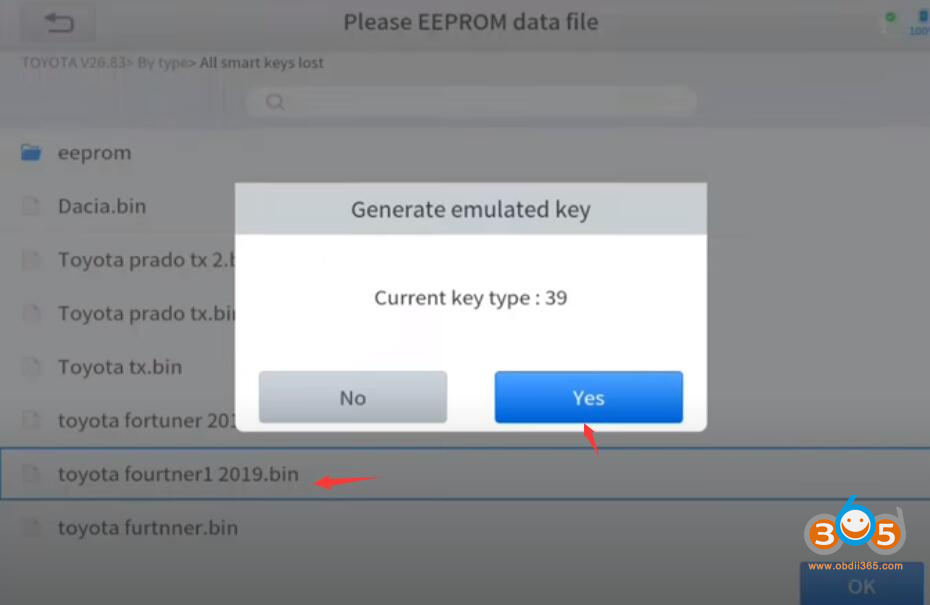
When the calculation is done, the emulated key will be generated.


Key Generation 8A
Still take the 2020 RW4 as an example.
Click “Generating key (with original keys)” or “Generating key (all keys lost)” and connect the emulator to the tablet.
input the VIN code and the model year of the car
Turn ignition off and take the original key out from the car.
Then when the notice pops out, put the emulator close to the start button and the emulator will start collecting and calculating.
After the collection and the calculation has done, we are now generating a new key. Please select the remote frequency of the key.


Please note that if you dick the wrong frequency, the remote and smart function will no longer work. Please make sure that you are selecting the correct frequency – this will vary upon different markets. If you have troubles finding the correct frequency, we will have some notices that mark the frequencies for different markets.
Then select the function of the THIRD button of the key (the button close to the lock/unlock button)

Normally the Toyota 8A/4A smart key will have 3 or 4 buttons on it. The lock/unlock/PANIC button are always the same, but the trunk (orA/C) button varies from different models (sometimes that button is missing). Please select it properly. If the key itself doesn’t have this button, select any of them will be OK.
Now find the lowfrequency antenna that is located inside the car. Put the emulator close to the antenna and the green light will flicker
When collecting data from the door handle, please dose the door and touch the sensing area on the front of the handle.
After that, pull the emulator out and connect KC501 to x100 tablet
Put the original key into the key slot
This step will be skipped when you are working in an all-keys lost situation.


After reading the original key, take it out and put the NEW KEY inside the slot. A battery needed to be installed into the new key before you continue.
Now the device will upload the data to the servers for calculations.
When this is done, the key will be generated Please check the remotes and see if it works. If it still doesn’t work after clicking several times, click “No” in this window to try again.
If the remote and smart function is not working, please click “No” and select other frequencies.

KEY GENERATION – 4A
There are some differences when programming 4A keys. We will take a 2021 Toyota Corolla as an example.
As before, we connect the emulator; turn ignition on if possible, then input the VIN, and turn off the ignition and take the original key out.
But after you collect the data from the low-frequency antenna (when the green light goes off), take the original key back inside the car; take it close to the emulator and press the remote button for several times.
The remote collection process will be skipped when you are working in an all-keys-lost situation.

After the calculations are done, take out the original key again, and collect the data from the low-frequency antenna again.
When this shows up, disconnect the collector and connect Xtool KC501 instead
Now put a NEW KEY with battery inside the slot.
Now it shows a success. Please check the remotes and see if it works. If not, click “No” to retry