Thursday, August 5, 2021

Xtool X100 Pro2 Blank Screen Solution

 Problem:

Can anyone help me please? My xtool x100 pro2 was working good so I wanted to update it but it didn’t work so I format it and now is not working at all.

xtool-x100-pro2-blank-screen-1

Solution:

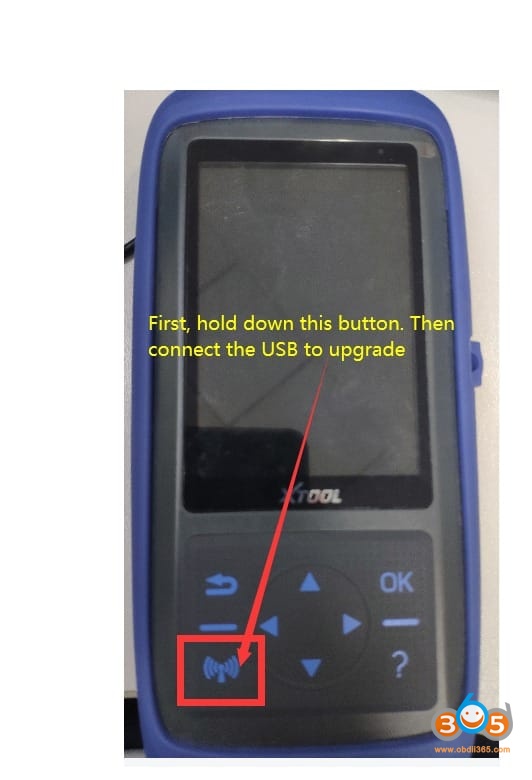
It is working now. Hold down this button, then connect the USB to update again.

xtool-x100-pro2-blank-screen-2

follow the guide here to update Xtool Xtool Pro2 via PC

https://www.obdii365.com/service/update-xtool-x100-pro2-tp200-x300p.html

xtool-x100-pro2-blank-screen-3


http://www.key-programmer.org/2021/08/06/solve-xtool-x100-pro2-blank-screen-problem/

Xtool X100 Pro2 and X100 Pro3 Comparison

 Both Xtool X100 Pro2 and Xtool X100 Pro3 are handheld scanner, they share the same OBDII scan and immobilizer key programming functions. Xtool X100 Pro3 has no odometer correction function and adds 5 special functions including Oil light reset, EPB (Electronic Parking Brake), Steering Angle Sensor (SAS) Service, TPS (Throttle Matching) and ABS Bleeding.

For language and update, there is no much difference.

 Xtool X100 Pro2Xtool X100 Pro3


OBDII/EOBDReading Codes, Erasing Codes & Reset, Data Stream, I/M Readiness, Read Live Data Stream, View Freeze Frame Data, O2 Sensor Test, On-Board Monitor Test, Read Vehicle Information, Component Test
Immobilizer Key programmingYesYes
EEPROMYes (pin code reading, EEPROM chip reading writing)Yes
Odometer CorrectionYesNo
Oil light resetNoYes
EPB (Electronic Parking Brake)NoYes
Steering Angle Sensor (SAS) ServiceNoYes
TPS (Throttle Matching)NoYes
ABS BleedingNoYes
LanguageEnglish, German,

Spanish, Portuguese, French, Italian, Polish, Russian

French, Chinese, English, Spanish, Portuguese, German, Russian, Polish, Italian
UpdateFree Update with Lifetime on Xtool

Official Website

Online update on Xtool

Official Website


Alright, here is the steps on how to update Xtool Xtool Pro2 (same as Xtool X100 Pro3)

https://www.obdii365.com/service/update-xtool-x100-pro2-tp200-x300p.html


Key programming: Xtool Xtool Pro2 VS Xtool X100 Pro3

Xtool Xtool Pro2Xtool X100 Pro 3


Asia:  Toyota,  Honda,  Acura,  Mazda,  Lexus, Mazda,  Nissan,  Infiniti,  Mitsubishi,  Subaru,  Suzuki,  KIA,  Hyundai,  SSANGYONG,  QNLUTUS,  MitsuokaAcura, Audi, Benz, Chery, Chrysler, Citroen,

Ds, Ferrari, Fiat, d, Geely, Gm, Honda, Hyundai,

Infiniti, Jaguar, Kia, Landrover, Lexus, Lincoln,

Maserati, Mazda, Mitsubishi, Nissan, Opel,

Peuegot, Porsche, Renault, Seat, Skoda, Smart,

Ssangyong, Subaru, Suzuki, Toyota, VW…


Europe:  Audi,  VW,  Skoda,  Seat,  Porsche, Opel,  Citroen,  Peugeot,  Jaguar, Land Rover,  Renault,  Benz,  Ferrari,  Fiat,  Maserati,  MG,  Smart,  DS
America:  Lincoln,  GM,  Chrysler,  d
China: Changan,  Changfeng,  Changhe,  Chery, Brilliance, BYD, Huapu, JAC,  Lifan, GreatWall, HNMAZDA, Lufeng,  Roewe, SQYL, ZZNISSAN, Luxgen, Geely,  Hongqi, Hawtai, Besturn, Baic,  Baojun,  Dffengshen,  Dfliuzhou,  Betpurn


If you need mileage correction function, keeps x100 pro2.

Xtool X100 Pro2 Odometer Adjustment Coverage:

AsiaHyundai,   Infiniti,   Isuzu,   KIA,

Mazda,   Mitsubishi,   Nissan,   Proton,   SSANGYONG,   Subaru,  Suzuki

Europe Audi, Bentley, Benz,Citroen, Ferrari, Fiat, Jaguar, Land

Rover,   Maserati,   Peugeot,   Porsche,   Renault,   Seat,   Skoda,   Smart,   Volvo,   VW

America Buick,  Cadillac,   Chrysler,   d/Lincoln,   GMC,   Hummer,   Oldsmobile,   Opel,   Pontiac,   Saturn
China Besturn,   Geely,   Greatwall,   MG Roewe


Enjoy!

Monday, August 2, 2021

Xtool X-VCI Max Software Download and Installation

 What is Xtool X-VCI Max?

XVCI Max is professional programming equipment that works with Xtool A80 Pro/H6 Pro diagnostic system for cars which supports SAEJ2534-1 and SAEJ2534-2 two international programming protocols.

xtool-x-vci-max-1

What’s the function of Xtool X-VCI?

J2534 ECU ProgrammingECU software upgrade and calibration & ECU replacement brush writing and programming

It has the same function as Autel MaxiFlash J2534 or MaxiIM JVCI box which is compatible with OEM manufacturer software to perform online programming.

It is the same as Autel MaxiSys that comes with built-in free BMW and Mercedes online programming.
It supports Land rover, Jaguar, Volvo, Toyota, GM, Honda etc OEM diagnosis software.


Xtool X-VCI Max Supported Brand List:

Supported VehiclesSoftwareMakeModel
Xentry, DAS DiagnosticBenzBenz, Smart, Maybach, FUGO
ISTA-D, ISTA-P, E-Sys, INPABMWBMW, MINI, Rolls Royce
Porsche (Tester2 and Tester 3 DoIP)PorschePorsche, New Porsche
HDS (HONDA Diagnostic System)HondaHonda, Acura
TIS (TOYOTA Techstream)ToyotaToyota, Lexus, Scion
SDD, JLR PathfinderLandrover JaguarLand Rover, Jaguar, New Land Rover, New Jaguar
VolvoVolvoVolvo, New Volvo
GDS2, Tech2winGMBuick, Chevrolet, Cadillac, Opel
Select Monitor SSM3, SSM4SUBARUSubaru
Ford IDSFORDFord, Lincoln, Ford Mustang
ODISVWVW, Audi, Skoda, Bentley, Lamborghini

How to Install Xtool X-VCI J2534 on PC?

xtool-x-vci-max-2

Free download X-VCI Max PC software driver on Xtooltech official website:

http://down.xtooltech.com/misc/XTOOL_VCI_Driver_1.6.2.0902.exe


How to Install X-VCI Max J2534 Driver?

Run XTOOL_VCI_Driver_1.6.2.0902.exe

xtool-x-vci-max-3

Hit Next

xtool-x-vci-max-4

Select software program you desired

xtool-x-vci-max-5

xtool-x-vci-max-6

Install VCI driver success

Hit Finish

Run Xtool VCI Driver

xtool-x-vci-max-7

Connect X-VCI Max with computer

xtool-x-vci-max-8

Detect J2534 box information

xtool-x-vci-max-9

Check software license

*Xtool VCI driver latest version is 1.62, you do not have to update the annoying license every 60 days.

VCI driver lists available OEM websites

xtool-x-vci-max-10

xtool-x-vci-max-11

X-VCI Max indicators turn on after connecting with vehicle and laptop successfully

xtool-x-vci-max-12

FAQs:

Q: XTOOL uses the same firmware as VXDIAG?

A: Xtool tablet is not. the X-VCI J2534 yes, it is made by Allscanner which also made VXDIAG. You do not have to update the annoying license every 60 days. All supported brands will work fine with OEM applications.


Q: IDS/SDD and other program is included or only downloaded and used with X-VCI, as well as to use it have to pay a subscription or you only pay if you want to flash a module?

A: The IDS/SDD/GDS2/SSM/Techstream etc program is the original software. You have to purchase a license from corresponding manufacturer.

The VCI is just the way to connect (no subscription required by itself). And it has the ease of function of being able to be used with programs like these or to access flashes by direct single payment from the assembly company.

In short, the VCI is the communication channel between the laptop and the vehicle.


Q: If he can program keys and flash modules like MaxiSys?

A:  This adapter is not intended for keys. He will program the modules without any problems.


Q: what is the password for the DoIP VCI WiFi connection?

A:  The password is standard 12345678.


Q: I wonder if in Mercedes it is possible to do online SCN coding, for example, reset NOx via SCN on new Mercedes?

A: Yes, Since SCN can be done for free via a80/h6 pro. But it will be possible to try do it online.


Q: Where can I get the original software? in the net, mostly broken software!

A: Dealer software is not included in the package. If you do not want to use broken software, then you need to BUY it.


Q: Xtool A80 pro with X-VCI and Autel Maxisys which is better?

A:  Xtool is different to Autel, some ways more powerful, some ways less powerful. Xtool price ($1,199) bits Autel if you need built-in BMW and Benz online programming.


http://blog.obdii365.com/2021/08/02/xtool-xvci-max-j2534-download-and-user-manual/

Tuesday, May 18, 2021

Renault Duster 95040 All Keys Lost by Xtool X100 PAD2/PAD3

 How-to: Renault Duster 2010-2013 all keys lost transponder key programming by Xtool X100 Pad2 or X100 PAD3 (PAD Elite) via eeprom.


Step 1: Read Pin Code

xtool-x100-pad3-renault-duster-akl-1

Remove Renault Duster BCM module and disassemble the module

xtool-x100-pad3-renault-duster-akl-2

Locate chip ic 95040

xtool-x100-pad3-renault-duster-akl-3

xtool-x100-pad3-renault-duster-akl-4

Desolder the Eeprom chip into xtool adapter

xtool-x100-pad3-renault-duster-akl-5

Connect the adapter with xtool Eeprom adapter (25XXX)

xtool-x100-pad3-renault-duster-akl-6

xtool-x100-pad3-renault-duster-akl-7

Then connect Eeprom adapter with xtool x100 pad3
In x100 pad, select Renault ->Immobilizer->Duster->2010-2013->Read pin code->Read Eeprom (95040)

xtool-x100-pad3-renault-duster-akl-8

xtool-x100-pad3-renault-duster-akl-9

xtool-x100-pad3-renault-duster-akl-10

Eeprom adapter communication indicator flashes

xtool-x100-pad3-renault-duster-akl-11

xtool-x100-pad3-renault-duster-akl-12

Read data success, save data

xtool-x100-pad3-renault-duster-akl-13

Calculate pin code success

Take a screenshot of the Pin Code.


Step 2: Program Key


Solder the eeprom chip back to BCM board and install BCM module

xtool-x100-pad3-renault-duster-akl-14

xtool-x100-pad3-renault-duster-akl-15

Feed with power supply and ignition equipments
Select Renault ->immobilizer->Duster->2010-2013->Program key
Switch ignition off, remove the key from the ignition switch

xtool-x100-pad3-renault-duster-akl-16

xtool will ask to input pin code to access
Manual enter pin code in step 1 and confirm

xtool-x100-pad3-renault-duster-akl-17

Insert a key to be programmed and turn the ignition on
Wait for 10 seconds

xtool-x100-pad3-renault-duster-akl-18

Program key success, select not to program another key
Turn the ignition switch off
Wait for 10 seconds

xtool-x100-pad3-renault-duster-akl-19

Program key finished.

Test the new key.

Done.

www.obdii365.com


http://www.key-programmer.org/2021/05/19/program-renault-duster-95040-all-keys-lost-by-xtool-x100-pad2-pad3/

Saturday, February 20, 2021

How to Solve Xtool Keeps Giving Network Error?

 Problem: 

I received the Xtool PS90 tablet. When register to activate the scanner, it kept giving network error but network is working my account keeps informing me i signed in but the tablet says not its frustrating any software i can download to fix?

xtool-network-error-1

xtool-network-error-2


Solution:

Check network connection. If network connection has no problem. The error may cause by the low App version.

Delete older Xtool App and install latest version. Problem will be solved.

The solution fits other Xtool products, X100 PAD, X100 PAD2 etc.


Wednesday, January 20, 2021

Xtool A80 Pro, A80 and X100 PAD3 Comparison

 Question: Any difference among the Xtool A80 Pro (H6 Pro), A80 (H6) and x100 pad3 (X100 PAD Elite)?


First of all, check the table comparison below:

Product nameXTOOL A80 ProXTOOL A80 H6XTOOL X100 PAD3
IMG 

Price$1,199$779$959
All system  diagnosisYes (supports action test+ data stream)Yes (supports action test+ data stream)Yes (read and clear fault code)
Immobilization/ key programmingYesYesYes
Odometer AdjustmentYesYesYes
ECU programmingYesNoNo
Brush hidden functionYesNoNo
EEPROM AdapterYesYesYes
Service/Maintenance LightYesYesYes
EPB (Electric Parking Brake)YesYesYes
Throttle RelearnYesYesYes
Window initializationYesYesYes
Tire Pressure ResetYesYesYes
ABS BleedingYesYesYes
Gearbox MatchYesYesYes
BMS ResetYesYesYes
HeadlightYesYesYes
Air SuspensionYesYesYes
Steering Angle Sensor AdjustmentYesYesYes
Crankshaft ResyncYesYesYes
DPFYesYesYes
Injector CodingYesYesYes
Airbag RepairYesYesYes
CylinderYesYesYes
Seat ConfigurationsYesYesYes
Electronic Pump ActivationNoNoYes
Disable TransportationNoNoYes
Performance Tire UpgradeNoNoYes
Hardware comparison:   
Operating SystemAndroidAndroidAndroid 5.1.1
CPUQuad core 1.8GHzQuad core 1.8GHzQuad core processor 1.8GHz
Storage space64GB32GB64GB
RAM2GB2GB2GB
Battery10,000mAh10,000mAh10,000mAh
Resolution1024*768P1024*768P1024*768P
Screen size8 inch8 inch8 inch
PortsHDMI, DCHDMI, USB3.0USB3.0,DC charging port,DB15 interface, MINI HDMI
CommunicationWiFi / BluetoothWiFi / BluetoothWiFi / Bluetooth
Camera8.0 Megapixel8.0 Megapixel, AF with a flashlightRear camera, 8 million pixels, with flash autofocus
UpdateFree update via WiFi2 years free update via WiFi2 years free update via WiFi
LanguageEnglish, German, French, Spanish, Polish, Italian, Japanese, Portuguese, Russian, KoreanEnglish, German, French, Spanish, Polish, Italian, Japanese, Portuguese, Russian, KoreanEnglish, German, French, Spanish, Polish, Italian, Japanese, Portuguese, Russian, Korean
Technical supportExpert service teamExpert service teamExpert service team


Summary:

The language, software update, function among them are similar.

A80 Pro (H6 Pro) vs. A80 H6:

1.A80 Pro supports online/offline ECU programming and brush hidden function while A80 H6 doesn’t support.

xtool-a80-pro-hidden-function

Note: “Brush hidden function” means that you can enter this function to activate all options are hidden in the original configuration such as automatic locking, cruise at fixed speed, one key automatic lifting window, etc.


2.The VCI box between them is different.

A80 Pro vs. X100 PAD3 (X100 PAD Elite):

1.A80 PRO supports all system diagnosis, action test and data stream but X100 PAD Elite only can read and clear fault code.

2.A80 Pro can perform ECU programming online or offline for part of car models and brush hidden function while X100 PAD3 cannot.

3.XTOOL X100 PAD Elite adds more special functions than other XTOOL diagnostic tools: Electronic Pump Activation, Disable Transportation and Performance Tire Upgrade. Besides, it supports more car models for key programming.


https://www.obdii365.com/service/xtool-a80-pro-vs-a80-vs-x100-pad3.html

Sunday, January 3, 2021

Can Xtool KC501 Program VVDI or CGDI Mercedes Key?

 Question: Can I use vvdi key or cgdi Mercedes key and program it with Xtool kc501 ???


Answer:

Both Mercedes BE key and BGA key from VVDI / CGDI can be used to program with Xtool KC501.

Here are the source of Mercedes BE key from Xhorse:

https://www.obdii365.com/wholesale/xhorse-vvdi-be-key-for-vvdi-mb-tool.html

BGA key from Xhorse:

https://www.obdii365.com/wholesale/benz-fbs3-mb-bga-keyless-go-key-433mhz.html


and Mercedes BE key from CG:

https://www.obdii365.com/wholesale/cg-key-for-cgdi-mb-key-programmer.html

BGA key from CG:

https://www.obdii365.com/wholesale/mb-fbs3-bga-keylessgo-key-315mhz.html

Good to know:

Usually, Xtool KC501 is connected to Xtool PAD to program Mercedes Benz key. If no Xtool PAD like X100 Pad3, you can use Xtool KC501 as a programmer to plug into a computer, then to read out EIS data and load it into VVDI MB / CGDI MB to generate the key.


This article is on how to read EIS data and then to add new key using Xtool X100 Pad3 + KC501.


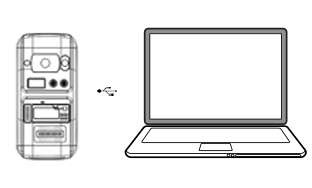
And look at the image which shows Xtool KC501 connected to a PC:

xtool-kc501-write-key-1


Guide on generate key and read key chip using Xtool KC501:

Put the key or key chip into the slot accordingly, connect to PC via USB, and open the software on PC

xtool-kc501-write-key-2

xtool-kc501-write-key-3


Info: Read the key information

Unlock: Unlock the key

Generate: Generate the key according to the chosen car brand


Select the car brand and tap the “generate” button, key will be generated.

xtool-kc501-write-key-4


Can read the data of the current key chip.

xtool-kc501-write-key-5

xtool-kc501-write-key-6

xtool-kc501-write-key-7


Enjoy!


www.obdii365.com