It is very simple to generate and program a remote to Hyundai i20 elite.
Here, will show you the how-to’s
All will be done with
VVDI mini key tool (generation)
Xtool x100 pad (programming)
Steps:
Step 1: generate Hyundai remote using mini key tool
the dashboard status
remote board is connected with mini key tool
run the mini key tool app
select a car model: Hyundai I20 Elite India
the remote info: RKE-4F22 15- 3BTN 1218
mini key tool starts to generate remote
programmed the remote successfully
put the battery inside remote and test it
works good!
Step 2: program Hyundai remote using Xtool X100 Pad
go to X100 PAD
program immobilizer
select from type – program remote – 16 pin – type 1
note: switch ignition on and then off and remove the key
program remote: press lock and unlock for more than 1s
remote programming is complete
test the remote
the functionality is good! success
http://www.obdii365.com/wholesale/xtool-x100-pad-with-built-in-vci.html
Thursday, September 19, 2019
Thursday, September 5, 2019
Xtool X100 Pad Program VW Polo Remote Key
How-to: Volkswagen Polo remote programming with xtool X100 Pad and VVDI mini key tool. These both tools are very easy to use and cheaper.
Remote generate by VVDI Mini key tool
Remote programming by xtool x100 pad
Step 1: Generate remote
Remove remote PCB and connect it with vvdi key tool via USB cable
In VVDI mini key tool App, select Vehicle Remote->VW->Polo and remote type
Press Generate
Generate remote success.
Install battery to the remote and install key shell.
Step 2: Program remote
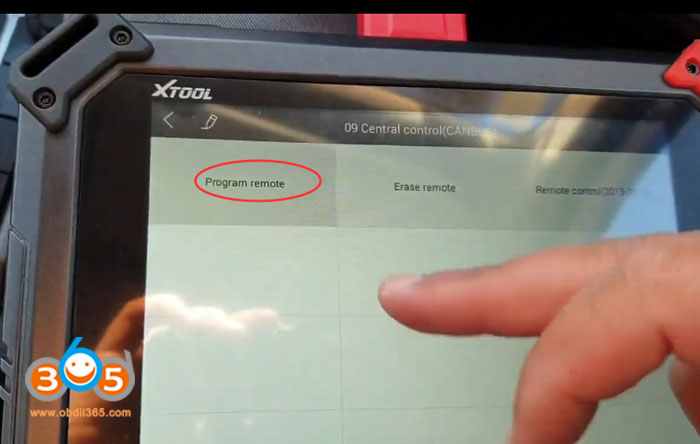
In X100 pad, select Immobilizer->VW/Audi/Skoda/Seat V27.59->Program remote->Turn on ignition switch->VW->09 Central Control (CANBUS)->Type 1
Press any button of the remote key
Program remote success.
Done.
http://www.key-programmer.org/2019/09/06/program-vw-polo-remote-with-xtool-x100-pad/
Wednesday, August 14, 2019
Xtool X100 Pad Program Dodge RAM Key on bench
Test: xtool x100 pad bench programming Dodge RAM immobilizer function
Result: Success !
Disclaimer:
The test was carried out by Mexican expert. You are at your risk.
Instructions:
set up bench connection
connect module with VCI module and x100 pad, connect another end to key lock EIS (with key inserted) and power supply
In X100 pad, select Immobilizer->Chrysler->Immobiliser/Fobik (WCM)->Auto detect
Auto detect Type 4
Select Read security code
Read pin code success
Then choose to program new key/old key and follow xtool x-100 pad prompts until success.
Done.
http://www.key-programmer.org/2019/08/14/program-dodge-ram-key-with-xtool-x100-pad-on-bench/
Result: Success !
Disclaimer:
The test was carried out by Mexican expert. You are at your risk.
Instructions:
set up bench connection
connect module with VCI module and x100 pad, connect another end to key lock EIS (with key inserted) and power supply
In X100 pad, select Immobilizer->Chrysler->Immobiliser/Fobik (WCM)->Auto detect
Auto detect Type 4
Select Read security code
Read pin code success
Then choose to program new key/old key and follow xtool x-100 pad prompts until success.
Done.
http://www.key-programmer.org/2019/08/14/program-dodge-ram-key-with-xtool-x100-pad-on-bench/
Sunday, July 7, 2019
Xtool X100 Pad2 Program VW Amarok 2015 Remote
2015 Volkswagen amarok remote programming success with Xtool X100 pad2. Clone chip using KD remote and keydiy Kd-x2 key copy machine.
Connect X100 Pad2 with vehicle
Select Immobilizer function->VW->Program remote->Turn on ignition switch-> 09 Central control (CAN BUS)->Program remote->Type 2
Press any button og the remote key for 3s
Xtool pad2 program 2015 VW amarok remote completed
Test the remote control
Done.
http://www.key-programmer.org/2019/07/08/program-vw-amarok-2015-remote-with-xtool-x100-pad2/
Connect X100 Pad2 with vehicle
Select Immobilizer function->VW->Program remote->Turn on ignition switch-> 09 Central control (CAN BUS)->Program remote->Type 2
Press any button og the remote key for 3s
Xtool pad2 program 2015 VW amarok remote completed
Test the remote control
Done.
http://www.key-programmer.org/2019/07/08/program-vw-amarok-2015-remote-with-xtool-x100-pad2/
Subscribe to:
Posts (Atom)