Test: xtool x100 pad bench programming Dodge RAM immobilizer function
Result: Success !
Disclaimer:
The test was carried out by Mexican expert. You are at your risk.
Instructions:
set up bench connection
connect module with VCI module and x100 pad, connect another end to key lock EIS (with key inserted) and power supply
In X100 pad, select Immobilizer->Chrysler->Immobiliser/Fobik (WCM)->Auto detect
Auto detect Type 4
Select Read security code
Read pin code success
Then choose to program new key/old key and follow xtool x-100 pad prompts until success.
Done.
http://www.key-programmer.org/2019/08/14/program-dodge-ram-key-with-xtool-x100-pad-on-bench/
Wednesday, August 14, 2019
Sunday, July 7, 2019
Xtool X100 Pad2 Program VW Amarok 2015 Remote
2015 Volkswagen amarok remote programming success with Xtool X100 pad2. Clone chip using KD remote and keydiy Kd-x2 key copy machine.
Connect X100 Pad2 with vehicle
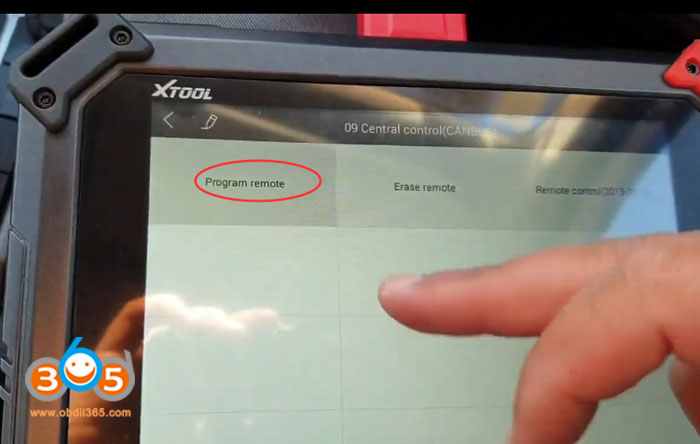
Select Immobilizer function->VW->Program remote->Turn on ignition switch-> 09 Central control (CAN BUS)->Program remote->Type 2
Press any button og the remote key for 3s
Xtool pad2 program 2015 VW amarok remote completed
Test the remote control
Done.
http://www.key-programmer.org/2019/07/08/program-vw-amarok-2015-remote-with-xtool-x100-pad2/
Connect X100 Pad2 with vehicle
Select Immobilizer function->VW->Program remote->Turn on ignition switch-> 09 Central control (CAN BUS)->Program remote->Type 2
Press any button og the remote key for 3s
Xtool pad2 program 2015 VW amarok remote completed
Test the remote control
Done.
http://www.key-programmer.org/2019/07/08/program-vw-amarok-2015-remote-with-xtool-x100-pad2/
Tuesday, June 25, 2019
Program 2004 Honda Fit Prox All Keys Lost with Xtool X100 Pad2
How to program 2004 Honda Fit Prox All Keys Lost with Xtool X100 pad2 key programmer.
Note: Do follow each IGN ON/OFF operations.
Go to Honda->Immobilizer-> Auto->16 PIN
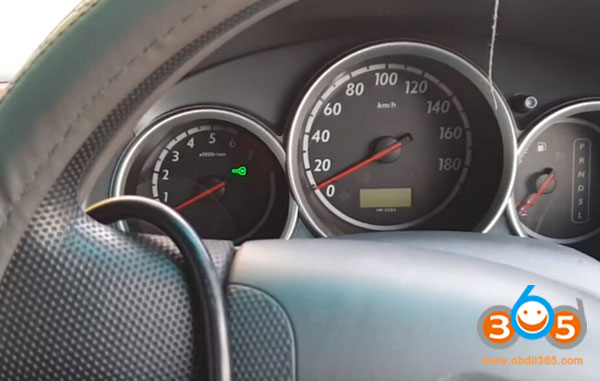
Turn on ignition switch
Xtool pad2 detects this model is 3rd generation immobilizer
Select Key function->All keys lost
Enter keys numbers to be registered (maximum 6 keys can be registered)
Turn ignition off
Turn off ignition within 17s
Turn on ignition switch without replacing key within 20s
Turn off ignition switch
Turn on ignition
Check if the immobilizer indicator goes off
Press YES to continue of indicator goes off
Turn off ignition switch
Turn on ignition
Key registration completed
Turn off ignition
Check all keys to ensure all keys can start engine
Turn on ignition and test key
www.obdii365.com
http://www.key-programmer.org/2019/06/26/xtool-x100-pad2-program-honda-fit-2004-all-keys-lost/
Wednesday, May 15, 2019
Program Ssangyong Rexton 434MHz Remote with Xtool X100 Pad2
Here is the step-by-step guide of making Ssangyong Rexton Remote 434 MHz using KD-X2 remote maker and matching that to the car using Xtool X100 pad 2.
Device used:
Original key
Keydiy universal wireless remote
Keydiy KD-X2 to generate remote
Xtool X100 pad2 to program remote
Procedure:
Step 1: Generate remote with KD-X2
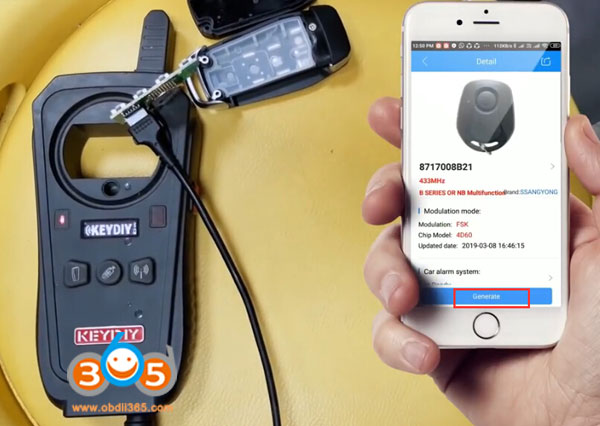
Connect universal remote PCB with KD-x2
Connect KD with app
In Keydiy App, select Remote Function-> Remote Generate->Ssangyong->8717008B21->Generate> Wireless Generation
Generate remote success
Step 2: Program remote with Xtool pad2
Turn on ignition switch with original key
In X100 pad2, select Ssangyong->Remote->Type 1->Program remote
Switch ignition off and remove key
Press remote button for 2 sec you want to match
Program remote success.
Test the remote control
Done.
www.obdii365.com
Device used:
Original key
Keydiy universal wireless remote
Keydiy KD-X2 to generate remote
Xtool X100 pad2 to program remote
Procedure:
Step 1: Generate remote with KD-X2
Connect universal remote PCB with KD-x2
Connect KD with app
In Keydiy App, select Remote Function-> Remote Generate->Ssangyong->8717008B21->Generate> Wireless Generation
Generate remote success
Step 2: Program remote with Xtool pad2
Turn on ignition switch with original key
In X100 pad2, select Ssangyong->Remote->Type 1->Program remote
Switch ignition off and remove key
Press remote button for 2 sec you want to match
Program remote success.
Test the remote control
Done.
www.obdii365.com
Tuesday, May 14, 2019
Xtool X100 Pad2 adds Europe and China Nissan Cars in May 2019
Good news!!! Xtool X100 PAD2 released new Nissan software update with many European and Chinese new immo key programming models.
Xtool Pad2 European Nissan model list:
350Z
370Z
Almera
Almera Tino
Altima
Armada
Cabstar
Cube
Elgrand(import)
Frontier
Interstar
Juke
Kubistar
Leaf
March
Maxima
Micar
Murano
Navara
Note
NV200
NV400
Pathinder
Patrol
Pixo
Primaster
Primera
Pulsar
Qashqai
Quest
Sentra
Skyline(import)
Skyline FTR-35
Terrano 2
Tiida
Titan
Xterra
X-trail
Xtrail Prox-twist
350Z
370Z
Almera
Almera Tino
Altima
Armada
Cabstar
Cube
Elgrand(import)
Frontier
Interstar
Juke
Kubistar
Leaf
March
Maxima
Micar
Murano
Navara
Note
NV200
NV400
Pathinder
Patrol
Pixo
Primaster
Primera
Pulsar
Qashqai
Quest
Sentra
Skyline(import)
Skyline FTR-35
Terrano 2
Tiida
Titan
Xterra
X-trail
Xtrail Prox-twist
Xtool X100 Pad 2 Nissan China (only partially)
Teana
New March
New Sunny
New Tiida
Altima Hybrid (07-11)
Lanna (2015-)
New X-trail
New Sylphy
Murano
Qashqai
Cima
Kicks
Teana
New March
New Sunny
New Tiida
Altima Hybrid (07-11)
Lanna (2015-)
New X-trail
New Sylphy
Murano
Qashqai
Cima
Kicks
Wednesday, April 17, 2019
Xtool X100 Pad2 works with other Software APP?
Question: Has anyone added another software to the Xtool x100 pad2 auto key programmer?
Answer:
Some Xtool Pad2 users has tested and confirmed working.
Tested:
Keydiy mobile KD works
Instacode works too
VVDI Key tool app
Disclaimer: We are not responsible for the damage. You are at your risk.
Example:
Mobile KD app & Keydiy Mini KD cable on Xtool PAD2 tablet
search on google play store "Mobile KD apk" and download it
Answer:
Some Xtool Pad2 users has tested and confirmed working.
Tested:
Keydiy mobile KD works
Instacode works too
VVDI Key tool app
Disclaimer: We are not responsible for the damage. You are at your risk.
Example:
Mobile KD app & Keydiy Mini KD cable on Xtool PAD2 tablet
search on google play store "Mobile KD apk" and download it
Subscribe to:
Posts (Atom)