Wednesday, May 15, 2019

Program Ssangyong Rexton 434MHz Remote with Xtool X100 Pad2

Here is the step-by-step guide of making Ssangyong Rexton Remote 434 MHz using KD-X2 remote maker and matching that to the car using Xtool X100 pad 2.

Device used:
Original key
Keydiy universal wireless remote
Keydiy KD-X2 to generate remote
Xtool X100 pad2 to program remote

Procedure:
Step 1: Generate remote with KD-X2
keydiy-kd-x2-ssangyong-rexton-1

keydiy-kd-x2-ssangyong-rexton-2


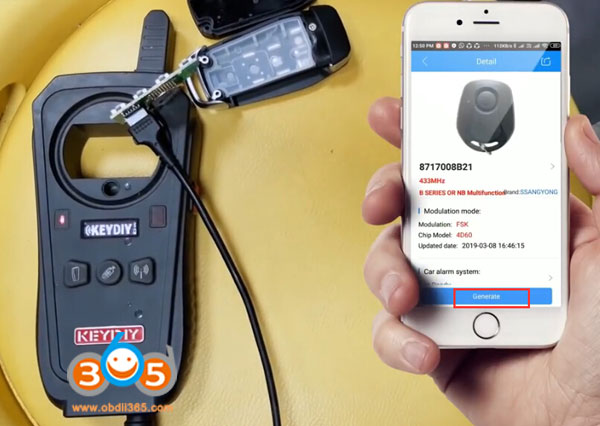
Connect universal remote PCB with KD-x2
Connect KD with app
In Keydiy App, select Remote Function-> Remote Generate->Ssangyong->8717008B21->Generate> Wireless Generation
keydiy-kd-x2-ssangyong-rexton-3

keydiy-kd-x2-ssangyong-rexton-4

keydiy-kd-x2-ssangyong-rexton-5

keydiy-kd-x2-ssangyong-rexton-6


Generate remote success
keydiy-kd-x2-ssangyong-rexton-7

Step 2: Program remote with Xtool pad2
Turn on ignition switch with original key
xtool-pad2-ssangyong-rexton-1

In X100 pad2, select Ssangyong->Remote->Type 1->Program remote
xtool-pad2-ssangyong-rexton-2

Switch ignition off and remove key
xtool-pad2-ssangyong-rexton-3

Press remote button for 2 sec you want to match
xtool-pad2-ssangyong-rexton-4

Program remote success.
xtool-pad2-ssangyong-rexton-5

Test the remote control
Done.
www.obdii365.com

Tuesday, May 14, 2019

Xtool X100 Pad2 adds Europe and China Nissan Cars in May 2019

Good news!!! Xtool X100 PAD2 released new Nissan software update with many European and Chinese new immo key programming models.

Xtool Pad2 European Nissan model list:
350Z
370Z
Almera
Almera Tino
Altima
Armada
Cabstar
Cube
Elgrand(import)
Frontier
Interstar
Juke
Kubistar
Leaf
March
Maxima
Micar
Murano
Navara
Note
NV200
NV400
Pathinder
Patrol
Pixo
Primaster
Primera
Pulsar
Qashqai
Quest
Sentra
Skyline(import)
Skyline FTR-35
Terrano 2
Tiida
Titan
Xterra
X-trail
Xtrail Prox-twist
xtool-x100-pad2-adds-EU-nissan-1

xtool-x100-pad2-adds-EU-nissan-2

xtool-x100-pad2-adds-EU-nissan-3

xtool-x100-pad2-adds-EU-nissan-4
Xtool X100 Pad 2 Nissan China (only partially)
Teana
New March
New Sunny
New Tiida
Altima Hybrid (07-11)
Lanna (2015-)
New X-trail
New Sylphy
Murano
Qashqai
Cima
Kicks
xtool-x100-pad2-adds-china-nissan

Wednesday, April 17, 2019

Xtool X100 Pad2 works with other Software APP?

Question: Has anyone added another software to the  Xtool x100 pad2 auto key programmer?

Answer:
Some Xtool Pad2 users has tested and confirmed working.
Tested:
Keydiy mobile KD works
Instacode works too
VVDI Key tool app

Disclaimer: We are not responsible for the damage. You are at your risk.

Example:
Mobile KD app & Keydiy Mini KD cable on Xtool PAD2 tablet
search on google play store "Mobile KD apk" and download it
xtool-x100-pad2-keydiy-kd-1

xtool-x100-pad2-keydiy-kd-2

xtool-x100-pad2-keydiy-kd-3

xtool-x100-pad2-keydiy-kd-4

xtool-x100-pad2-keydiy-kd-5

xtool-x100-pad2-keydiy-kd-6


Sunday, April 7, 2019

Program Hyundai i20 Smart Key with Xtool X100 Pad2

How-to: generate and program Hyundai i20 smart key with VVDI Mini Key Tool and Xtool X100 Pad2.

Step 1: Generate remote with VVDI Mini Key Tool
Insert Xhorse universal smart key into detection coil
vvdi-mini-key-tool-hyundai-i20-1

vvdi-mini-key-tool-hyundai-i20-2

vvdi-mini-key-tool-hyundai-i20-3

vvdi-mini-key-tool-hyundai-i20-4

Select Vehicle Remote->Hyundai->Elite i20 C7000 ID46 433 15+ 3BTn 2432
Press Generate
vvdi-mini-key-tool-hyundai-i20-5

Generating remote in progress
vvdi-mini-key-tool-hyundai-i20-6

Generate remote succeed


Step 2: Program smart key with xtool x100 pad2
Connect X100 pad 2 with vehicle via OBD socket
Select Hyundai->Security Code->47 Authorization code (smart card)
xtool-x100-pad2-hyundai-i20-1

xtool-x100-pad2-hyundai-i20-2


Enable network connection before reading security code
Turn on ignition switch
xtool-x100-pad2-hyundai-i20-3

Read security code success
Select Program Immobilizer/remote->Smart key system->China-> Type 5 (without card slot)
xtool-x100-pad2-hyundai-i20-4

xtool-x100-pad2-hyundai-i20-5

xtool-x100-pad2-hyundai-i20-6

xtool-x100-pad2-hyundai-i20-7

Press Start button to continue
xtool-x100-pad2-hyundai-i20-8

Select Program smart keys
xtool-x100-pad2-hyundai-i20-9

Xtool X100 pad 2 will ask to enter security code to access
xtool-x100-pad2-hyundai-i20-10

Put the original key close to the Start button
xtool-x100-pad2-hyundai-i20-11

Program success. Press YES to program next key
xtool-x100-pad2-hyundai-i20-12

Put the smart key to be programmed close to the Start button
xtool-x100-pad2-hyundai-i20-13

Program smart key success
xtool-x100-pad2-hyundai-i20-14

xtool-x100-pad2-hyundai-i20-15


Test remote control and start car.
Done.

www.obdii365.com

Tuesday, April 2, 2019

How to Register and Update Xtool A80 H6 OBD2 Scanner?

Xtool A80 H6 Scanner Activation and Software Update Instruction

In view of the H6 Elite/A80/H6 Pro/H6D Pro/H6 Pro Master product activation and upgrade instruction, take H6 Elite as an example.
Step 1. Click the Settings icon on H6 Elite.register-xtool-a80-h6-1
Step 2. Turn on Wi-Fi and connect to available internet.
register-xtool-a80-h6-2


Step 3. H6 will automatically prompt that you need to activate, please click NEXT.
register-xtool-a80-h6-3


Step 4. Please fill in the company name and mailbox, (no need to fill in Phone number cause overseas phone number cannot receive the auth code.), then click OK to complete the activation.
register-xtool-a80-h6-4


Software Upgrading

Step 1. Please open H6 APP and click update.
register-xtool-a80-h6-5


Step 2. You can choose Update all or any single software to upgrade.

register-xtool-a80-h6-6


http://www.obdii365.com/service/update-xtool-a80-h6-diagnostic-tool.html